
Is there a trick to display different photos for the slideshow on the home page (photos in the index folder)?
I would like to display only photos taken in portrait format on small mobile devices and only photos taken in landscape format on larger screens (landscape format).
Otherwise, the photos often look garbled or you have to find a selection of photos that are suitable for both views.
Could I create 2 folders from which the photos are displayed depending on the device? In one folder I would put the portrait photos, in the other the landscape photos.
I have not found any suitable switches with which to achieve this. Are there other ways?
X3Photo Gallery Forums
X3 Photo Gallery Support Forums

Re: Different slideshow for start page according to landscape and portrait format
This is a dilemma for all "slideshow" type galleries that are supposed to "embed" directly on the page (regardless of device), and that's why I personally never use it to show photos (I use the popup for that, as it's optimal for image viewing). I would personally only use the slideshow "intro" plugin as an intro to give a concept of what the page is about, and make sure to use an image (or several) that conveys itself well when "cropped" by screen aspect. (like mjau-mjau.com).
I wish I could tell you there was a solution for this, but X3 can't just load different galleries depending on aspect ratio of device. Slideshow is really just a gallery of images (like any other gallery), and in this case it's just assigned as "intro" (attached to top). In a future release, I will probably consider a solution for this, but it would probably have to be a unique "intro" feature separate from the page's gallery.
I wish I could tell you there was a solution for this, but X3 can't just load different galleries depending on aspect ratio of device. Slideshow is really just a gallery of images (like any other gallery), and in this case it's just assigned as "intro" (attached to top). In a future release, I will probably consider a solution for this, but it would probably have to be a unique "intro" feature separate from the page's gallery.
Re: Different slideshow for start page according to landscape and portrait format
Thank you for your answer. This issue has been raised several times in the past and I realize that it is not easy.
There are some places in the system where you can turn off something for small mobile devices. And so I had the idea if this function could not be used to hide a folder depending on the device class or not. Unfortunately, apparently not possible.
There are some places in the system where you can turn off something for small mobile devices. And so I had the idea if this function could not be used to hide a folder depending on the device class or not. Unfortunately, apparently not possible.
Re: Different slideshow for start page according to landscape and portrait format
This is for Javascript related plugins, and how they apply for mobile devices. For example the audio player, which can be disabled for mobile devices, which is logical and applicable.pede wrote:There are some places in the system where you can turn off something for small mobile devices.
You are asking for loading two different folders depending on device. First of all, when a "page" in X3 gets generated and cached, the images/files are already loaded into the page and cache. Requesting separate images for different devices would require us to NEVER cache the page, and always load content dynamically from Javascript (instead of up front). Furthermore, we are now entering SEO-territory because you are basically loading two entirely different galleries based on device ... What images should Google use?
My point is, this is still a page gallery, although it's set to "intro" mode. If you wanted an intro to work differently on different screens, this should probably be a separate plugin, unrelated to the X3's page gallery. Even then, it's tedious if you want multiple different images in a slideshow for different screen aspects ... Have you seen anything like this on any other website? Just curious.
Re: Different slideshow for start page according to landscape and portrait format
Hi. I have the same problem here... it's very hard to chose images in the intro slideshow that look well on both computer and mobile phone. The slideshow itself is amazingly good, with all the options, slide effect, etc... but with the increasing amount of clients and prospects watching images on their phone, it's very important to have the best views in both formats. (I don't know weather X4 is coming one day but this would be a "must have" feature).
In the meantime, could it be possible to have two index pages and a htaccess or php redirect depending on device ? not sure I am making sense here but I just had the idea...
In the meantime, could it be possible to have two index pages and a htaccess or php redirect depending on device ? not sure I am making sense here but I just had the idea...
Re: Different slideshow for start page according to landscape and portrait format
Personally, I wouldn't really consider the intro slideshow unless using images that carry meaning regardless of how they are cropped (like in our demo or on my mjau-mjau.com page). The unfortunate, yet logical fact, is that full size "cropped" images will simply need to be cropped according to the device aspect ratio. That's why you don't really see this much in the first place ...
Of course, when someone (a designer) is designing a specific website from scratch, they might create a CSS-specific solution that might select intro images depending on the device aspect ratio. You can't really expect this from a pure "slideshow" module however.
Of course, when someone (a designer) is designing a specific website from scratch, they might create a CSS-specific solution that might select intro images depending on the device aspect ratio. You can't really expect this from a pure "slideshow" module however.
This is actually the best "workaround" idea I have heard by far, and it wouldn't be too complicated. Something like this:petri71 wrote:In the meantime, could it be possible to have two index pages and a htaccess or php redirect depending on device ? not sure I am making sense here but I just had the idea...
- Duplicate your index page as "mobile" or just "m" (or anything)
- For the mobile page, select portrait aspect images for the slideshow (obviously)
- On the index page, add a simple javascript function that redirects portrait-aspect devices to the /mobile/ page.
Re: Different slideshow for start page according to landscape and portrait format
Ok thank you for your answer, I will prepare both of the indexes and get back to you when ready for redirect test...
Re: Different slideshow for start page according to landscape and portrait format
Do I have to create a folder first and put the mobile page in it ? I can't seem to copy index in the same path
Re: Different slideshow for start page according to landscape and portrait format
I found the solution, I copied into another folder, than rename it, than move it to the same level as the index ;-)
Re: Different slideshow for start page according to landscape and portrait format
called it mindex :-)
Re: Different slideshow for start page according to landscape and portrait format
Sure. It doesn't really matter what you call the folder, but it will be the /url/ in browser when redirected on mobile. In your case, it will be /mindex/. Personally, I would prefer /mobile/ or just /m/ ... On mobile, the url will probably not even be visible, so it doesn't really matter ...petri71 wrote: called it mindex :-)
You don't strictly need to copy or duplicate the index page, but since you obviously want to create a page with same/similar content as your normal index page.petri71 wrote: I found the solution, I copied into another folder, than rename it, than move it to the same level as the index ;-)
So you have now the normal /index/ page and another page /mindex/ meant for mobile?
I think now, you could do something as simple as this. Go to page /index/ > Settings > Page > Advanced > Page Javascript:
Code
if(!matchMedia('(min-aspect-ratio: 1/1)')) location.replace('/mindex/');
Re: Different slideshow for start page according to landscape and portrait format
Thank you for your answer...
but it does not seem to work
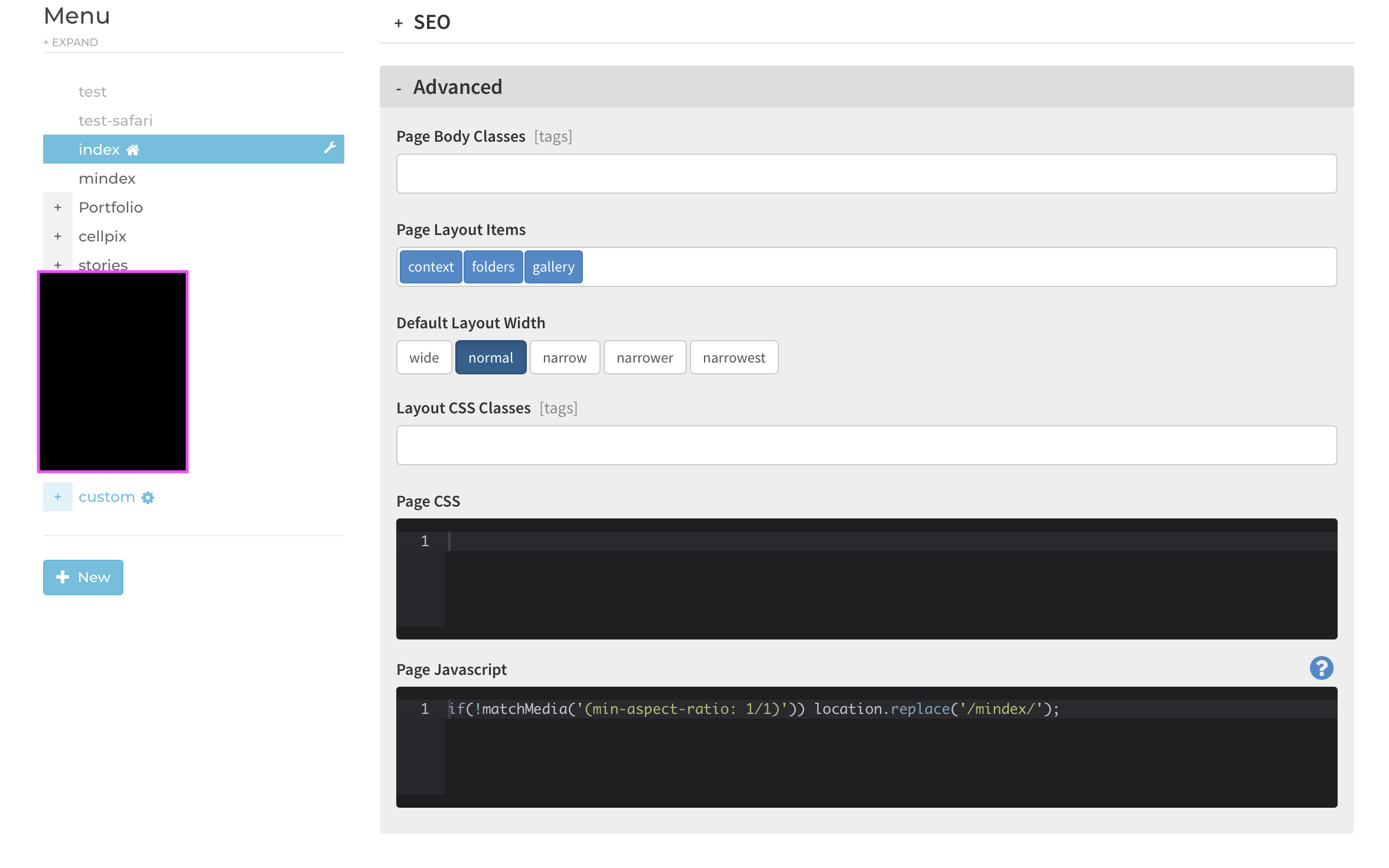
but it does not seem to work
Re: Different slideshow for start page according to landscape and portrait format
this one works though :
Code
if (!window.matchMedia('(min-aspect-ratio: 1/1)').matches) {
  // Only redirect if not already on /mindex
  if (!window.location.pathname.includes('/mindex')) {
    location.replace('/mindex/');
  }
}Re: Different slideshow for start page according to landscape and portrait format
I already tried it locally. Besides, the code in your second request doesn't make sense. It basically says "If this code works, then additionally check that the page is not '/mindex' before redirecting to '/mindex'". The original code must be working to even get that far ... and you should NOT have this code on the /mindex page, ONLY the main /index page, as stated in my original instructions ...
Seems like you had a redirect loop if you had the code both on the /index page and the /mindex page ... It's supposed to be ONLY on the /index page, because that's where you will be redirecting from.mjau-mjau wrote:Go to page /index/ > Settings > Page > Advanced > Page Javascript:
Re: Different slideshow for start page according to landscape and portrait format
I have never had any code in the mindex page only the real index... as you can see in the screenshot above.
so now I put your code back and it does not work..
so now I put your code back and it does not work..