Page 1 of 1
HOW TO - Start page with image folders [RESOLVED]
Posted: 04 Jun 2014, 16:31
by yummy
Hello everyone,
I would like to make a start page similar to the website
http://www.abertrande.com/#/start/ but i can't find the way to do it.
Can you explain me step by step how to make a four images thumbnail to my start page redirecting to four different folders ?
Thank you very much for your explanation on this
Best
Re: HOW TO - Start page with image folders
Posted: 04 Jun 2014, 23:58
by mjau-mjau
This can be achieved by a manual process:
mjau-mjau wrote:1. Go to admin -> settings -> settings.attributes.image, add the link item.
2. Go to admin -> settings -> thumbnails.thumbnail.click, instead of "open", choose "link"
3. Navigate to your start folder, and upload 4 images that each represent the galleries you want to link to.
4. Click the images, and you will see a new field in your admin called "link". Add the relative link to each of your galleries for each image ... for example #/gallery/.
Re: HOW TO - Start page with image folders
Posted: 05 Jun 2014, 03:05
by yummy
Thank you very much for your quick reply which answered to my request

Best
Re: HOW TO - Start page with image folders [RESOLVED]
Posted: 05 Jun 2014, 03:32
by yummy
Last question:
How can i let appear the folder where the image is linked to when passing the mouse on it as
http://www.abertrande.com/ made ?
Is it a description to the image?
I tried to make title appear in Settings >> Thumbnails >> Text >> Tittle selected but it only show the tittle of the page "Starts" not the folders where my four images redirect to...
Thanks for your help
Re: HOW TO - Start page with image folders [RESOLVED]
Posted: 05 Jun 2014, 03:34
by yummy
Ok i understand to myself:
Settings >> Thumbnails >> Tooltip >> Items >> Name selected and Enable the Tooltip
Here we go
Re: HOW TO - Start page with image folders
Posted: 09 Jun 2014, 07:15
by andreamarucci
mjau-mjau wrote:This can be achieved by a manual process:
mjau-mjau wrote:1. Go to admin -> settings -> settings.attributes.image, add the link item.
2. Go to admin -> settings -> thumbnails.thumbnail.click, instead of "open", choose "link"
3. Navigate to your start folder, and upload 4 images that each represent the galleries you want to link to.
4. Click the images, and you will see a new field in your admin called "link". Add the relative link to each of your galleries for each image ... for example #/gallery/.
Can you explain please? I can't find even the first one...

Re: HOW TO - Start page with image folders [RESOLVED]
Posted: 09 Jun 2014, 13:40
by mjau-mjau
Well, you need top go to admin, click [settings] ... Then click the "settings" tab, scroll down and click "attributes", and see the image item with checkboxes. Here is a snapshot even:

Re: HOW TO - Start page with image folders [RESOLVED]
Posted: 09 Jun 2014, 23:48
by Martin
Re: HOW TO - Start page with image folders [RESOLVED]
Posted: 10 Jun 2014, 10:44
by andreamarucci
Thank. I've done all that but I really can't figure out how to configure the start page. Here is how it's configured now but if I choose custom doesn't work, and if I choose slideshow it show me just one picture at a time.
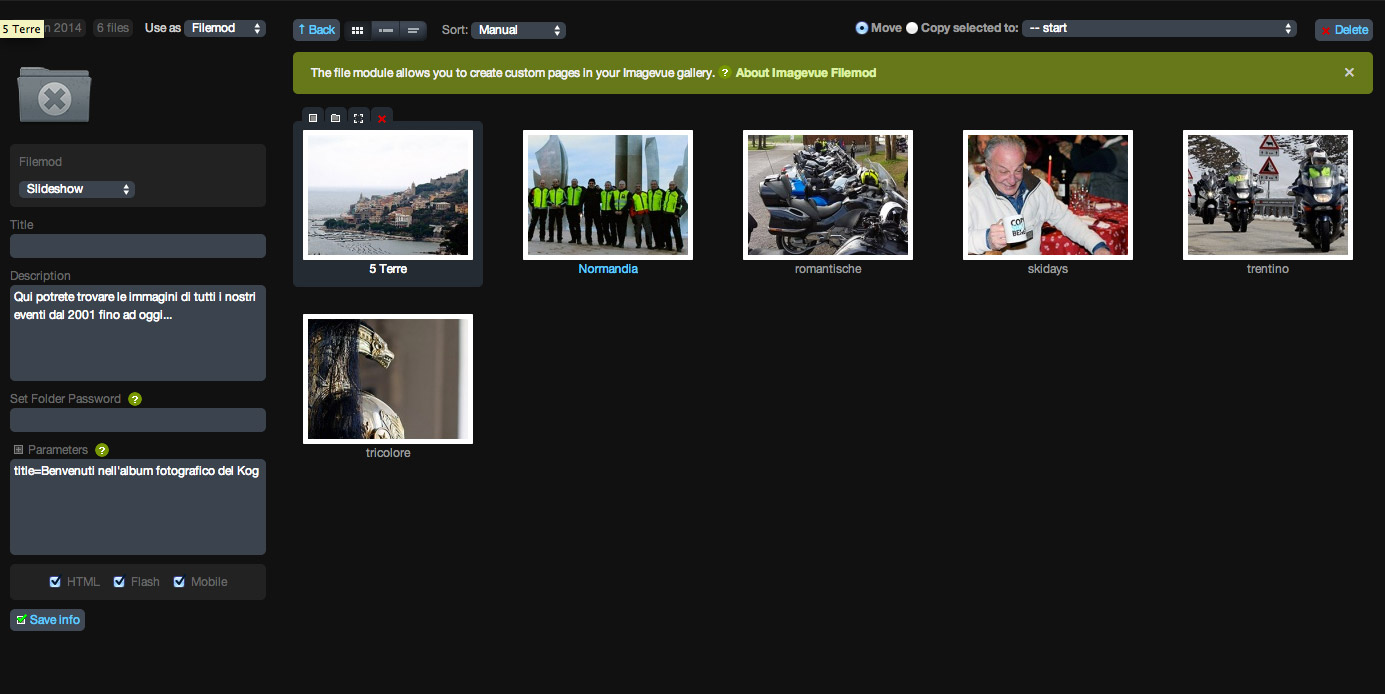
- sch.jpg (119.97 KiB) Viewed 6832 times
Maybe I don't have to use the start folder but I've to create a new one?
please help
Re: HOW TO - Start page with image folders [RESOLVED]
Posted: 10 Jun 2014, 10:57
by andreamarucci
Also, if it's possible. I'd like that the thumbs in the start page are bigger that the ones in the galleries...
Re: HOW TO - Start page with image folders [RESOLVED]
Posted: 10 Jun 2014, 11:58
by mjau-mjau
You need to set it as a "normal" gallery mode ... Since you are using the custom settings, the links should trigger ...
If you want bigger thumbnails, you need to click "create thumbs" in top right corner:

Re: HOW TO - Start page with image folders [RESOLVED]
Posted: 12 Jun 2014, 09:05
by andreamarucci
Thanks, this worked. The only problem is that
1 - If I hover on the thumbnail the title of the image (which I've set) doesn't appear over the thumb
2 - I'm not able to display the description of this folder (which is set)
Thanks!
Re: HOW TO - Start page with image folders [RESOLVED]
Posted: 13 Jun 2014, 04:35
by andreamarucci
OK solved both problems...