Page 1 of 2
Start Page
Posted: 06 Aug 2013, 03:50
by abertrande
hello
I would like to test a new presentation on my website
to the start page I would like to place folders on my portfolio
but it's doesn't work
I created a folder "Start" and I put two folders "seascape and Landscape" with one picture for the test
in the setting I chose to open the home page with "Start" mode but nothing
is it possible?
thanks
Re: Start Page
Posted: 06 Aug 2013, 08:41
by mjau-mjau
I am not quite sure what you are trying to do, but folders will always display in the menu, NOT in the content area in the middle. The content area is for displaying images in folders that are clicked.
If you want to have two images that link to subfolders on the startpage, then you will need to use links to redirect when clicking thumbnails of normal images (not folders).
Re: Start Page
Posted: 06 Aug 2013, 09:01
by abertrande
Thank
No, I wish folders in the middle

Re: Start Page
Posted: 06 Aug 2013, 09:43
by abertrande
I put a link with a picture but I hope that the page opens in the same window
is it possible ?
thank
www.abertrande.com
Re: Start Page
Posted: 06 Aug 2013, 10:35
by Andre Boss
looks very nice, how did you do that?
i meand i know how to do a folder but how could you make this bigger images on the start page?
because your normal thumbnails are smaler...
thank you and kind regards
andré
Re: Start Page
Posted: 06 Aug 2013, 10:44
by abertrande
Andre Boss wrote:looks very nice, how did you do that?
i meand i know how to do a folder but how could you make this bigger images on the start page?
because your normal thumbnails are smaler...
thank you and kind regards
andré
thank you very much
you create a folder and you put pictures in.
After you click on the "thumbs" tab at the top right and you change the size of your thumbnail
Re: Start Page
Posted: 06 Aug 2013, 10:47
by Andre Boss
cool, thank you very much!

Re: Start Page
Posted: 06 Aug 2013, 10:49
by abertrande
mjau-mjau wrote:I am not quite sure what you are trying to do, but folders will always display in the menu, NOT in the content area in the middle. The content area is for displaying images in folders that are clicked.
If you want to have two images that link to subfolders on the startpage, then you will need to use links to redirect when clicking thumbnails of normal images (not folders).
Find
I put a link with a picture but I hope that the page open in the same window
is it possible ?
thank
Re: Start Page
Posted: 07 Aug 2013, 02:25
by mjau-mjau
abertrande wrote:I put a link with a picture but I hope that the page open in the same window
is it possible ?
Just change your link to from absolute "
http://www.abertrande.com/#/portfolio/seascape/" to relative:
Re: Start Page
Posted: 07 Aug 2013, 02:45
by abertrande
I have changed and now I have a white page
Re: Start Page
Posted: 07 Aug 2013, 07:31
by mjau-mjau
You changed it back again? I can't check it if you changed it back.
Re: Start Page
Posted: 07 Aug 2013, 10:20
by abertrande
mjau-mjau wrote:You changed it back again? I can't check it if you changed it back.
I can't show a white page on my website
I paste the code now
i's ok now
thank
Re: Start Page
Posted: 10 Aug 2013, 02:59
by Bulletproof IT
I cannot find this input field anywhere.
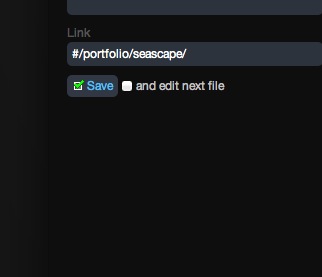
Where did you add this?
Or is it a matter of creating a parameter
"link=#/blah/blah" ?
Actually, all I have is Title and Description input fields when viewing a photo.
Re: Start Page
Posted: 10 Aug 2013, 04:05
by abertrande
Bulletproof IT wrote:I cannot find this input field anywhere.
Where did you add this?
Or is it a matter of creating a parameter
"link=#/blah/blah" ?
Actually, all I have is Title and Description input fields when viewing a photo.
Look the screenshot

Re: Start Page
Posted: 10 Aug 2013, 06:54
by Bulletproof IT
Aaaaaaaaaaahhh!
