Page 1 of 2
Blog in dashboard
Posted: 15 Mar 2013, 12:03
by janus
I upgraded a clients installation to v2.8.8.1 last week and the main site is working fine, but logging in to admin today, I see that there are no imagevue blog posts in the dashboard... I can see the twitter feed, but the blog to its right is blank (heading and rss logo are there, but no content below)... i'm pretty sure there was content there when I upgraded, so just wondering if there is a problem with the feed or if its something that i've done... or if my memory is failing and its always been blank!
I did add a .htaccess file that blocked all IPs from logging in apart from myself and the client to the admin folder, but I don't think it can be this as even when disabled, the blog section of dashboard is still blank.
it's not important to the functionality of the site, i'm just curious to find out what's causing it and how to fix it.
Re: Blog in dashboard
Posted: 17 Mar 2013, 01:17
by mjau-mjau
This I am not sure, but it does work here at least, also in latest version:

Could be some kinda server blocking somehow, as it brings in RSS data from a remote server.
Re: Blog in dashboard
Posted: 17 Mar 2013, 09:34
by janus
Hi Karl,
thanks for the reply and for confirming that memory is still working (well more or less!) and that is what I remember seeing.
I've found the problem and think i've solved it - there's a small out of date line of code in one of the files.. on line 35 of dashboard.index.phtml
<script src="http://feed2js.org//feed2js.php?src=http%3A%2F%2Ffeeds.feedburner.com%2FImagevue&num=5&desc=400&html=p" type="text/javascript"></script>
if I put 'www' into the start of that URL it then works...
<script src="http://www.feed2js.org//feed2js.php?src=http%3A%2F%2Ffeeds.feedburner.com%2FImagevue&num=5&desc=400&html=p" type="text/javascript"></script>
going directly to
http://feed2js.org just gives a 503 Service Temporary Unavailable error.
if you run their "Build A Feed" form, the link it now generates starts '
www.feed2js.org' - so maybe they've tweaked their server settings it in the last few days and only 'www' works now.
hope that helps and you can include it in future updates.
Re: Blog in dashboard
Posted: 17 Mar 2013, 13:07
by mjau-mjau
Seems like its something with your internet connection perhaps DNS ... Because it certainly works fine from here non-www:

It happens because I see now this is javascript called from the client, and since your internet for some reason has problems calling that URL, the JS just dies and the dashboard does not get populated. It is nothing with neither feed2js or Imagevue ... :/
Re: Blog in dashboard
Posted: 17 Mar 2013, 19:56
by janus
mjau-mjau wrote:It happens because I see now this is javascript called from the client, and since your internet for some reason has problems calling that URL, the JS just dies and the dashboard does not get populated. It is nothing with neither feed2js or Imagevue ... :/
perhaps it has a greater chance of working for you as imagevue and feed2js are both hosted at cloudflare...
anyway, I googled for others seeing the same problem and found the following link...
http://cogdogblog.com/2011/09/27/red-alert-for-feed2js/
it's a quote from Alan Levine (feed2js author) from a couple of days ago... from the bottom of the page of comments.
The outages are not everywhere, it seems to be a regional issue with the content distribution network we began using.
I would suggest finding an alternative service anyhow; I am likely going to phase out the service by June and/or convert it to a fee based one. I cannot sustain support for a wide open one. The code is always free to download and install on your own server.
so I suspect for future versions, you're going to have to host your own version of the script.
Re: Blog in dashboard
Posted: 18 Mar 2013, 23:56
by Nick
I it resolved in Imagevue X2.8.8.2
Re: Blog in dashboard
Posted: 19 Mar 2013, 07:13
by janus
updated to the new version and i'm now getting the following error when going to the dashboard...
Fatal error: Call to a member function getElementsByTagName() on a non-object in /iv-admin/controllers/DashboardController.php on line 39
other parts of admin appear to be working fine, so have disabled the dashboard in settings for now until this is resolved.
Re: Blog in dashboard
Posted: 20 Mar 2013, 00:48
by Nick
Hmm this is a sad news, looks like you might have something specific configuration on your server preventing requests to RSS field to be made.
Unfortunately with PHP you often find that things do not work as planned everywhere. Might I ask you for an ftp login to see what is going on and patch it up for the next update?
Re: Blog in dashboard
Posted: 20 Mar 2013, 11:41
by janus
Nick,
I think the URL may be the problem... I ran another php parser script to access the rss file and it threw up the following error -
Document is empty in https://www.photo.gallery/rss/, line: 1
assuming that the above link is just a redirect, I edited the original dashboardcontroller.php file and changed the URL to either -
https://www.photo.gallery/feed/
or
[LINK REMOVED]/Imagevue
either will work for me.
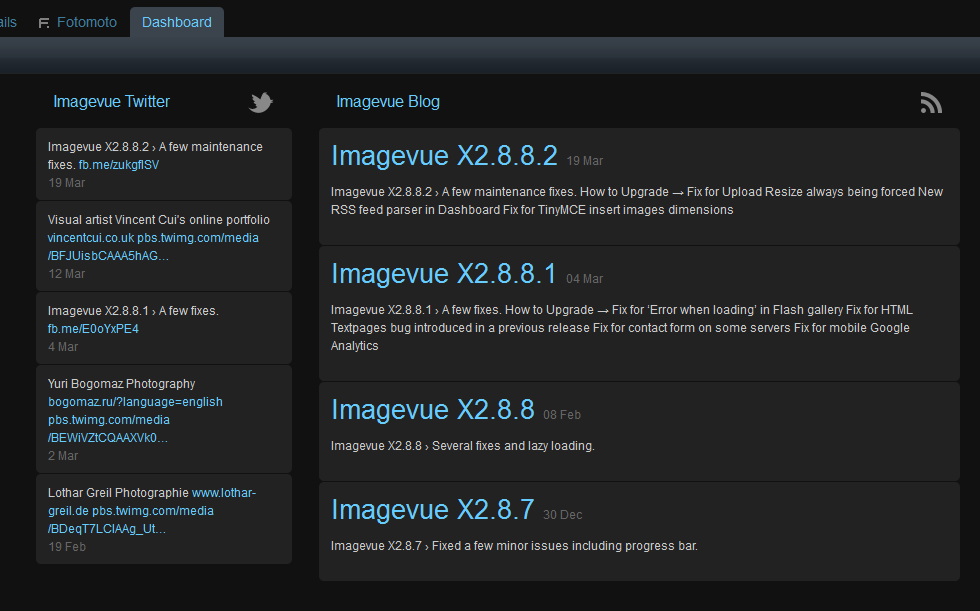
- imagevuex.png (31.19 KiB) Viewed 10126 times
this is what i'm now seeing in Firefox v19.02 (though as the titles are slightly larger, I've reduced the listed posts from 5 to 4)... also looks the same in Chrome too.
hope this helps.
Brian
Re: Blog in dashboard
Posted: 21 Mar 2013, 22:16
by Nick
Good job, thanks, I'll change the code in Imagevue as well according to your findings.
Re: Blog in dashboard
Posted: 05 May 2013, 12:12
by dollknoll
Same (dashboard) problem here (version 2.8.10). I get the following message:
Fatal error: Call to a member function getElementsByTagName() on a non-object in /var/www/web1/html/bw-peterrees-com/iv-admin/controllers/DashboardController.php on line 39
I change the link in DashboardController.php from
https://www.photo.gallery/feed/
to
[LINK REMOVED]/Imagevue
but nothing happens.
Peter
http://blackandwhite.peterrees.com
Re: Blog in dashboard
Posted: 05 May 2013, 12:49
by Nick
Hmm, sounds like this is something local to your installation, I could take a look to see if there is a way to solve this for other people who might have this issue if you PM me your ftp login.
Are all the files from the new version uploaded properly?
Re: Blog in dashboard
Posted: 05 May 2013, 19:44
by janus
if it helps Nick, i've just upgraded my clients installation from v2.8.8.2 to v2.8.10 and the dashboard is working fine for me.
dollknoll, i'd suggest following Nick's advice and reuploading and seeing if that works..
Brian
Re: Blog in dashboard
Posted: 12 May 2013, 00:47
by Dr_Leeb
Hello, I just upgraded to the latest version and my gallery reports the same error.
Fatal error: Call to a member function getElementsByTagName() on a non-object in /iv-admin/controllers/DashboardController.php on line 39
Re: Blog in dashboard
Posted: 12 May 2013, 07:09
by janus
Dr_Leeb wrote:Hello, I just upgraded to the latest version and my gallery reports the same error.
Fatal error: Call to a member function getElementsByTagName() on a non-object in /iv-admin/controllers/DashboardController.php on line 39
from experience (unless Nick tells you differently!), that error usually means it can't find the RSS feed - either because it was down when you logged into dashboard or there is a network issue between your hosting company (Yahoo) and the imagevue feed server.
you could try putting another RSS feed from a different site in the dashboardcontroller.php code below:
private function getRSSFeed($feedURL='https://www.photo.gallery/feed/')
I just tested mine by changing it to a BBC News feed and it works fine, but you should choose one that you know works for you (probably from your own country).
if imagevue shows this new feed, then you'll know that imagevue script is fine... and the problem is between Yahoo and the imagevue feed server... if imagevue doesn't show the new RSS feed, and you KNOW the RSS is working, then that would indicate a script or installation error.
our dashboard is still working with the imagevue feed, so I don't think it's an error with imagevue, but more likely network issues at your end (or imagevue's).