Page 1 of 1
color of comments "number"
Posted: 29 Oct 2012, 15:43
by Bmacuser
Hello Artur
First many thanks for your great work to make imagevue much more powerful!!!
I have tried several things but couldnt find the menue to change the color of the comment "numbers" in the main menue bubble on top.
The displayed number of comments inside the bubble.
Thanks in advance
Regards
Bjoern
Re: color of comments "number"
Posted: 29 Oct 2012, 16:24
by Artur
All texts are customisable in CSS Stylesheet.
You need to find (or add) style caled:
powerpack_topbar_comments_number
Re: color of comments "number"
Posted: 07 Nov 2012, 04:44
by Bmacuser
Hello Artur
thanks for your response. I^m not that fit with CSS yet. In which file do i need to add the code or can i do it directly in the backend? I think i also have to add the color code inside the coding.
Regards
Bjoern
Re: color of comments "number"
Posted: 07 Nov 2012, 09:58
by Artur
Hello.
The style you can add / edit in your imagevue admin panel:
Themes -> [your theme] -> Edit Stylesheet
Here is an example:

Re: color of comments "number"
Posted: 07 Nov 2012, 14:18
by Bmacuser
Hello Artur.
Thanks now i have learned more about the CSS.
hm, strange. tried this but no result. did the edit on imagevue.css and color.css as well. let me check the next days if there could be another reason for this.
In your example there is no dropdown to choose for "magevue.css" / "color.css" as it is in my version.
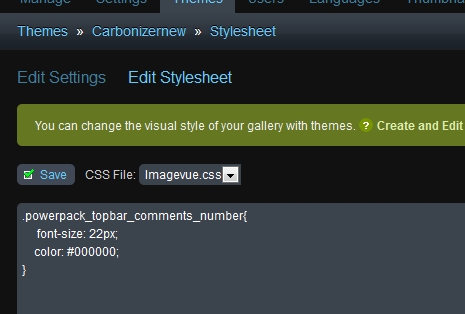
- powerpack_number.jpg (50.22 KiB) Viewed 4925 times
Edit: If i use the imagevue.css in the "style" setting than its working. but if i use the "color.css" than its not working although there is an edit of this code in both.
Re: color of comments "number"
Posted: 07 Nov 2012, 14:24
by Artur
Did you check whether powerpack_topbar_comments_number style already exists in the code?
Perhaps it's twice now.
(if you installed PowerPack, all the styles should already be in "magevue.css". Somewhere at the bottom of the CSS Stylesheet - all styles with "powerpack" name)
Also remember that always when you modify CSS you have to clear your browser cache, otherwise you may not see some changes on your site.
Re: color of comments "number"
Posted: 07 Nov 2012, 14:39
by Bmacuser
In the color.css there is no powerpack coding. i put this single code to the bottom. Yes in the imagevue.css all powerpack default settings are at the bottom. i only add the font-size and color. browser chache was also cleared. if color.css is not working i will put the color.css content to imagevue.css and then it should work. mabe another reason that its not working on the color code.