Page 1 of 2
How do I remove Admin Login
Posted: 16 Aug 2012, 08:05
by justwildlife
Hi
I want to have following tasks in ImageVueX
1. Remove top IV-Admin login link and info.
2. Modify : This is you gallery.... which appears on start page just above the image.
See the attachment.
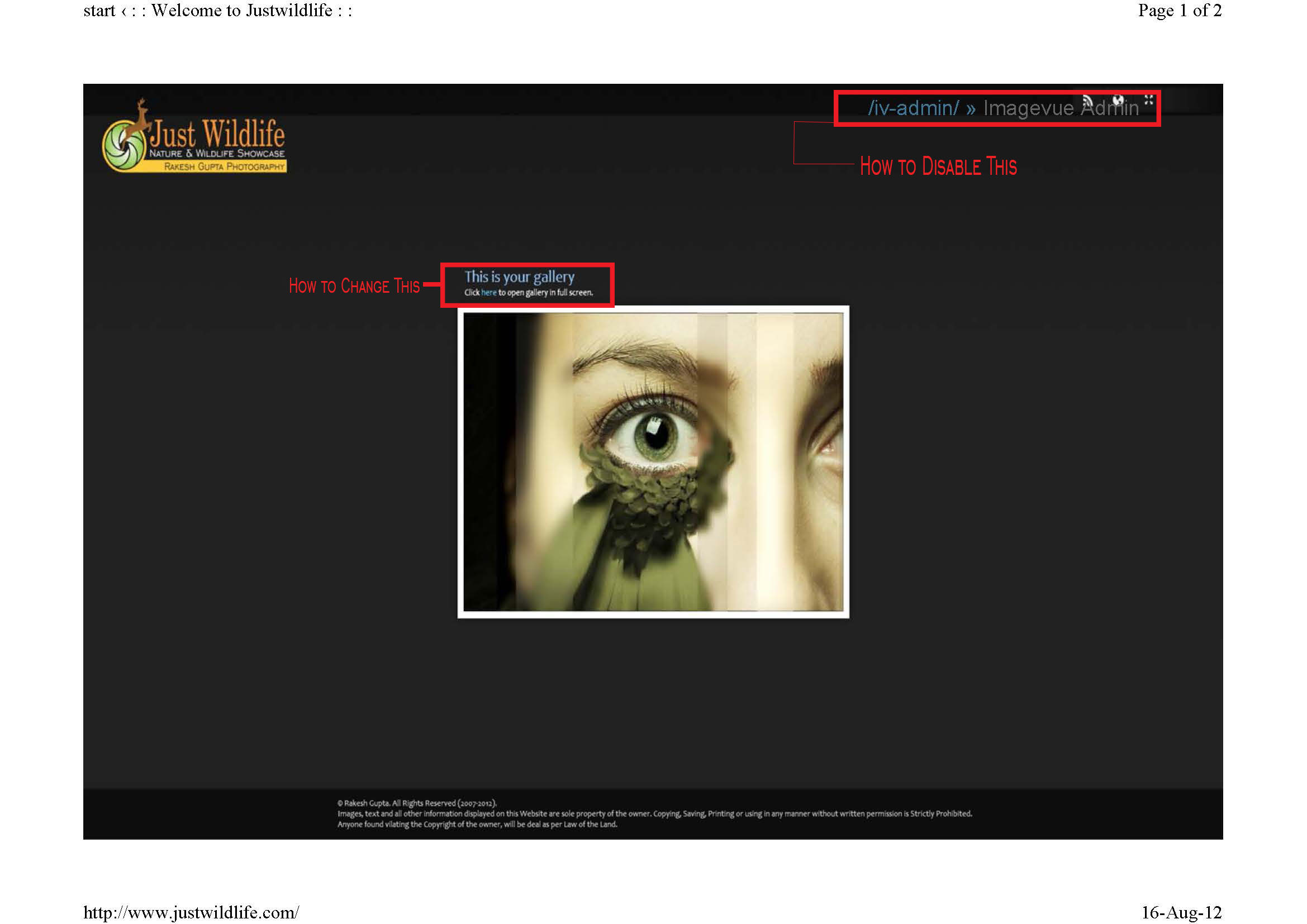
- sample_Page_1.jpg (129.43 KiB) Viewed 7598 times
Re: How do I remove Admin Login
Posted: 18 Aug 2012, 01:03
by mjau-mjau
justwildlife wrote:1. Remove top IV-Admin login link and info.
First of all, you are the only person who sees this since you are logged in to the admin. None of your visitors will see it. Furthermore, if you are using the latest release, this text is minimized further and look like this:

justwildlife wrote:2. Modify : This is you gallery.... which appears on start page just above the image.
This is on your start folder? Navigate to your start folder in the admin (startpath in settings), and on the left you will see its either in title+description, or further down in the parameters field.
Re: How do I remove Admin Login
Posted: 21 Aug 2012, 09:18
by justwildlife
Mjau-Mjau
To verify whether it is me who is seeing /IV-Admin/ string on website or others are also seeing this.
I asked few of my friends and also I asked my neighbours to visit my website and everyone confirmed that they are seeing this string on top of page.
What I feel is that as I'm using Trial Copy and do not have functionality to add users that may be one of the reasons why it is displaying this string.
Re: How do I remove Admin Login
Posted: 22 Aug 2012, 02:00
by mjau-mjau
You are right.
This is not normal behavior, as the admin bar would normally
only display if you forgot to reset the default login/password. Just like the reason you
don't see it in our
demo gallery, because we have changed the admin login naturally.
There is no difference in this functionality with any trial version.
Did you edit any files? Did you upgrade to X2.8.2 recently on top of an older version?
May I ask for login credentials to your admin, so we can take a look?
Ultimately, if you could install a fresh version of Imagevue in a subfolder /imagevuetest/ and we could test this functionality from a fresh upload, that would help diagnose the issue.
Re: How do I remove Admin Login
Posted: 22 Aug 2012, 02:02
by Nick
If you provide the ftp login we can take a look what is going on.
Re: How do I remove Admin Login
Posted: 22 Aug 2012, 08:12
by justwildlife
mjau-mjau wrote:You are right.
This is not normal behavior, as the admin bar would normally
only display if you forgot to reset the default login/password. Just like the reason you
don't see it in our
demo gallery, because we have changed the admin login naturally.
There is no difference in this functionality with any trial version.
Did you edit any files? Did you upgrade to X2.8.2 recently on top of an older version?
May I ask for login credentials to your admin, so we can take a look?
Ultimately, if you could install a fresh version of Imagevue in a subfolder /imagevuetest/ and we could test this functionality from a fresh upload, that would help diagnose the issue.
Dear Mjau-Mjau
Login credentials are :
user : jwladmin
pass : rk2212ji
Re: How do I remove Admin Login
Posted: 22 Aug 2012, 23:06
by mjau-mjau
I have fixed this issue for now by simply removing the admin-bar with CSS code ...
I am still not sure why it is trying to display, as this is not normal behavior. If we are to technically solve it, you would need to answer the questions in my previous post first of all ...
Re: How do I remove Admin Login
Posted: 23 Aug 2012, 00:52
by justwildlife
mjau-mjau wrote:I have fixed this issue for now by simply removing the admin-bar with CSS code ...
I am still not sure why it is trying to display, as this is not normal behavior. If we are to technically solve it, you would need to answer the questions in my previous post first of all ...
Dear Mjau-Mjau
My replies to the questions :
Did you edit any files?
No I did not edited any of the files as I'm not familiar with PHP.
Did you upgrade to X2.8.2 recently on top of an older version?
This was the first time I installed ImagevueX on my Server after deleting all older data.
I'm installing ImagevueX in separate test folder so for testing purposes, the Website link will be :
http://www.justwildlife.com/test
Login will be admin and password admin which is default.
Re: How do I remove Admin Login
Posted: 23 Aug 2012, 04:06
by mjau-mjau
... and for some reason, this gallery works 100% correctly as it does on other servers, as the admin link is now hidden after I changed the login. I have forwarded the password I set, in a private message. Case closed.
Re: How do I remove Admin Login
Posted: 23 Aug 2012, 04:58
by justwildlife
Dear Mjau-Mjau
Thanks.
Last question : How do I move this data to actual Imagevue Installation. The installation which is giving error.
Re: How do I remove Admin Login
Posted: 24 Aug 2012, 02:40
by mjau-mjau
justwildlife wrote:Last question : How do I move this data to actual Imagevue Installation. The installation which is giving error.
Delete the Imagevue-related content in root, and then copy/move the stuff from test folder? Just like you would copy/move stuff around locally.
Why not just continue as is until you know what you are gonna do ? ... both your galleries are working flawlessly right now, although the root gallery required a small hack because of either A) a corrupted file uploaded/edited or B) a server flaw ... both which would require FTP to locate.
Re: How do I remove Admin Login
Posted: 24 Aug 2012, 03:07
by justwildlife
mjau-mjau wrote:justwildlife wrote:Last question : How do I move this data to actual Imagevue Installation. The installation which is giving error.
Delete the Imagevue-related content in root, and then copy/move the stuff from test folder? Just like you would copy/move stuff around locally.
Why not just continue as is until you know what you are gonna do ? ... both your galleries are working flawlessly right now, although the root gallery required a small hack because of either A) a corrupted file uploaded/edited or B) a server flaw ... both which would require FTP to locate.
Dear Mjau-Mjau
I've created an FTP Account for your to check.
* removed
Use Google Chrome to login because in IE this login won't work.
Re: How do I remove Admin Login
Posted: 24 Aug 2012, 04:39
by mjau-mjau
You should not post your FTP login public in the forum, so i have remove it.
Re: How do I remove Admin Login
Posted: 24 Aug 2012, 04:42
by mjau-mjau
Besides, this FTP you provided does not access the root of your domain. I suggest you proceed as normally for now ... You don't even own a license as I understand?
The issue on your server is related to one of the following:
A) A corrupted file uploaded
B) An issue with your server (not imagevue)
Even if I do get access, I would simply delete the imagevue in root and re-upload it, likely fixing the error in the first place.
Re: How do I remove Admin Login
Posted: 24 Aug 2012, 10:25
by justwildlife
Dear Mjau-mjau
Just to double check the issue, I removed all the files and contents from the root of my website which includes the default installed trial copy of Imagevuex.
Reinstalled from scratch and found that if I install ImageVueX in root of my Website then it does not hide the /IV-Admin label from top when visitor is a guest.
If I move the installation to a sub-folder then it works perfectly.
I have also changed the ftp access level to the root of Domain.
Regards
Rakesh