Page 1 of 1
Load imagevuex into another flash
Posted: 23 Aug 2011, 16:47
by disenoweb
Hi,
I'm triying like as enough people in this forum to load imagevuex into another swf to see if I can have a logo at top left of my site and this is above the menu, and also that we can use a flash logo. Tried with png but logo is below the menu and look bad...
There are some posibility to make this more or less correctly to work or do you think that there are too problems to get this?
I'm thinking of hiring a programmer to do this but first I want to make sure that is possible without excessive effort to kill my budget.
Do you think that some like this will be useful?
_http://activeden.net/item/full-screen-resize-align-pattern-swf-picture/10399
_http://activeden.net/item/objects-alignment-background-embed-/5302
Could you explain if this is possible and how we can get this working correctly?
Maybe that this will be a new request to next versions?
Sorry for my english. I attached an image to see that I tell.
Thanks.
Regards.
JM
Re: Load imagevuex into another flash
Posted: 24 Aug 2011, 04:59
by Nick
Would it be sufficient to have HTML border around the Imagevue Gallery? Or you want to have Imagevue loaded in another flash file no matter what?
Re: Load imagevuex into another flash
Posted: 25 Aug 2011, 03:47
by mjau-mjau
disenoweb wrote:I'm triying like as enough people in this forum to load imagevuex into another swf to see if I can have a logo at top left of my site and this is above the menu, and also that we can use a flash logo. Tried with png but logo is below the menu and look bad...
Just for the record, you can place a logo above your menu. You load your logo into top left as a theme background, and then you change settings to move the menu downwards ..
disenoweb wrote:There are some posibility to make this more or less correctly to work or do you think that there are too problems to get this?
In regards to what you are trying to do, I would suggest avoiding it. SWF (Imagevue) does not work like embedding an image. Even if you do create a parent SWF, and load Imagevue into it, you cannot just "position" imagevue as if it was a JPG image inside a restricted area in your own SWF. The actionscripts behind Imagevue are programmed to take advantage of all available space, and all alignment and positioning will happen depending on the SWF Stage. When you load Imagevue into a SWF, you cannot set the "size" of the loaded SWF ...
So all in all, yes you can load Imagevue into another SWF, but I don't recommend it based on what I understand you are trying to do. Maybe you can explain better what effect you are trying to achieve, and I can make some suggestions.
Re: Load imagevuex into another flash
Posted: 29 Aug 2011, 15:21
by disenoweb
That I want is load imagevuex in my base swf in a level below imagevuex and that imagevuex align to center of the stage.
So we can put images or links in every corner of my main swf and imagevuex look below and centered in this main movie, so always my logo and the others cornes are above even if imagevuex show large images.
Is for this that I ask you if this file will be useful for this:
_http://activeden.net/item/full-screen-resize-align-pattern-swf-picture/10399
I want to do what this flashden movie make. Load and external swf (imagevuex) below the content of main movie.
If this is not possible in any way would it be sufficient to have HTML border around the Imagevue Gallery but compatible with all browsers and without using frames.
I hope I explained correctly, my english is not good.
Thanks.
Regards.
JM
Re: Load imagevuex into another flash
Posted: 30 Aug 2011, 02:11
by mjau-mjau
disenoweb wrote:That I want is load imagevuex in my base swf in a level below imagevuex and that imagevuex align to center of the stage.
Technically speaking, this is simply not that easy because dynamic SWF files (like Imagevue) simply do not have specific width and height. Neither will they be able to conform to virtual borders (how would imagevue know that it can't utilize the stage beyond certain margins?). This will just not work "out of the box" ...
disenoweb wrote:Is for this that I ask you if this file will be useful for this:
_http://activeden.net/item/full-screen-resize-align-pattern-swf-picture/10399
I can not say if this would work, but I would remain skeptical. Imageuve is not an "element" or just another "swf" ... It is an application that uses math from the entire stage size and aspect to control interface elements, thumbnails and image sizing. How this thing would persuade Imagevue of something else, I am not sure ...
disenoweb wrote:If this is not possible in any way would it be sufficient to have HTML border around the Imagevue Gallery but compatible with all browsers and without using frames.
If you really need to limit Imagevue within a certain area, then this is absolutely the way to go. Browser compatibility is not a problem either ... You wouldn't use a frame, as you would simply use <div> to contain Imagevue within a certain area.
Re: Load imagevuex into another flash
Posted: 30 Aug 2011, 16:06
by disenoweb
I tried with that movie from activeden but with no luck, the movie don't load anything.
Like you say:
It is an application that uses math from the entire stage size and aspect to control interface elements, thumbnails and image sizing.
How hard is to put a couple of new elements (one in right top corner for a logo and other centered in the bottom to put there a footer text for example) in the imagevuex movie and position this in Imagevue, above the other content?
There are some posibility that you give me the fla of imagevuex to see if I can play with this to get some fix to get taht I want?
Also I'm triying some using css and <div> but any help is welcome.
Thanks.
Regards.
JM
Re: Load imagevuex into another flash
Posted: 31 Aug 2011, 00:06
by Artur
disenoweb wrote:...so always my logo and the others cornes are above even if imagevuex show large images.
You can do it with an swf background. Example:
some code in your imagevue swf background:
 load_MC();

function load_MC(){
	var container:MovieClip = _root.createEmptyMovieClip("container", _root.getNextHighestDepth());
	container.loadMovie("External.swf");
}
Append code to main movieClip in your External.swf file, for show the movieClip in the upper left corner::
onClipEvent(load){
	// keep in mind that his 'registration point is on the "top-left".
	this._x= o;
	this._y= 0;

	Stage.addListener(this)
	this.onResize=function(){
		this._x= 0;
		this._y= 0;
	}
}
You should also remember to add this in first frame in your external movie clip:
Stage.scaleMode = "noScale";
Stage.align = "TL";
Re: Load imagevuex into another flash
Posted: 31 Aug 2011, 12:59
by disenoweb
Thanks Artur
This work fine but still a little issue:
I can set the x position of the menu from the top left corner with x_offset but no can set y_offset that is that I need because the menu is show above the logo.
There are some way to set also the y_offset of the menu?
Artur? Can you tell me how add another mc in background like the logo and this align centered in bottom to have a footer.
Also have another issue with menu, my menu have many subcategories and when open some subcats the scroll of the menu is too fast or too sensitive to mouse movements. I suppose that this can be set in main fla of imagevuex, so I request again if you can provide me with the fla file of imagevue.
Thanks.
Regards.
JM
Re: Load imagevuex into another flash
Posted: 31 Aug 2011, 13:37
by Artur
You can sets the vertical margin between the menu and the top edge of the stage. So, go to Admin->themes-> Menu, and change value in "Vertical Margin" settings.
Code for your footer:
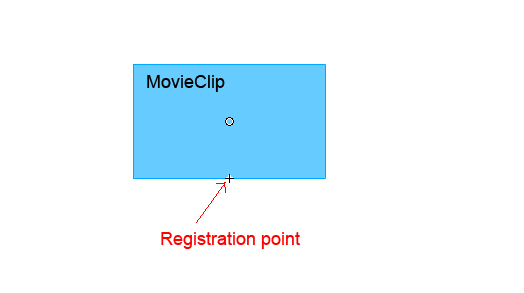
(Set the registration point of your movieClip to the "bottom-center".)
onClipEvent(load){
	this._x= Stage.width/2;
	this._y= Stage.height;
	Stage.addListener(this)
	this.onResize=function(){
		this._x= Stage.width/2;
		this._y= Stage.height;
	}
}
Re: Load imagevuex into another flash
Posted: 01 Sep 2011, 01:16
by mjau-mjau
Normally, you can set a logo above the menu by simply hiding the "Main menu" button when collapsed. In this case, your logo would act as the trigger that unfolds the menu when you roll over it. Effectively this works the same as vertical align, because you can push the opened menu further down vertically.
https://www.photo.gallery/documentation/cust ... -the-menu/
Re: Load imagevuex into another flash
Posted: 01 Sep 2011, 14:52
by disenoweb
Thanks again Artur, I owe you one.
With your help now I have that I want, my logo aligned in top right above all elements in the stage. All look fine now.
I tried to put also a footer but have this issues:
I made a new swf for my footer and set the code that you suggest me but I don't see nothing when publish this swf or load from background like the logo.
If set
   Stage.addListener(this)
   this.onResize=function(){
	this._x= Stage.width/2;
	this._y= Stage.height;
to
   Stage.addListener(this)
   this.onResize=function(){
	this._x= Stage.width/2;
	this._y= Stage.height/2;
So I see the content center-aligned
and another thing is that if I load from background my logo and after my footer, like this two load in
_root.getNextHighestDepth());
always I only see the last swf that background load.
How can I load this 2 different swf (logo and footer) from background? Some like load logo in
_root.getNextHighestDepth());
and after load footer in
_root.getNextHighestDepth + 1());
Regards.
JM
Re: Load imagevuex into another flash
Posted: 01 Sep 2011, 16:18
by Artur
disenoweb wrote:
I made a new swf for my footer and set the code that you suggest me but I don't see nothing when publish this swf or load from background like the logo.
Are you sure, you set registration point to the "bottom-center"?
- Bez nazwy-2.jpg (15.47 KiB) Viewed 11136 times
disenoweb wrote:
How can I load this 2 different swf (logo and footer) from background? Some like load logo in
_root.getNextHighestDepth());
and after load footer in
_root.getNextHighestDepth + 1());
You can't do that

.
When you call function "
_root.createEmptyMovieClip("container", _root.getNextHighestDepth());" it's simply mean that movieClip "
container" with loaded swf will apear on the top of root swf (imagevue.swf). So, you can't just say "load next one level higher", because this will already the highest level

.
The reason why (i think...) you get only last loaded swf, is because you load both to the same MC called "
container". So, when one is loaded, then seccond unloading it, and take his place...
You could load your second swf in "
container2", but you don't need load 2 different swf's. It's enough if you load to the "
container MC" 1 swf file with 2 movieClip's (or even more if you like), and append code to each one movieClip for locating it on the stage.
Re: Load imagevuex into another flash
Posted: 02 Sep 2011, 15:41
by disenoweb
One more time thanks Artur.
I've seen your pictures and are very good. Congratulations.
With your help I solved all that I wanted.
Following your instructions now I load my 2 mc (logo and footer) in same swf and all work like a charm.
Only a last question Artur.
I want load another mc and that this show in the bottom right corner, I made some googling but nothing found that help me.
Could you give me the code for show another movieClip in the bottom right corner?
Regards.
JM
Re: Load imagevuex into another flash
Posted: 02 Sep 2011, 16:11
by Artur
disenoweb wrote:I've seen your pictures and are very good. Congratulations.
Thanks
disenoweb wrote:
Could you give me the code for show another movieClip in the bottom right corner?
Set MC registration point on the "bottom-right".
onClipEvent(load){
	this._x= Stage.width;
	this._y= Stage.height;
	Stage.addListener(this)
	this.onResize=function(){
		this._x= Stage.width;
		this._y= Stage.height;
	}
}
For MC in bottom left corner:
Set MC registration point on the "bottom-left".
this._x= Stage.width;
this._y= 0;
For MC in upper right corner:
Set MC registration point on the "top-right".
this._x= Stage.width;
this._y= 0;
For MC in center left corner:
Set MC registration point on the "center-left".
this._x= 0;
this._y= Stage.height/2;
For MC in center right corner:
Set MC registration point on the "center-right".
this._x= Stage.width;
this._y= Stage.height/2;