Page 1 of 1
Grey area covering the background
Posted: 11 Mar 2011, 06:51
by Trax
I managed to get a part of the background transparent, so now there only is a grey area covering what's left.
And I can't find the option to delete this color ANYWHERE

It's CCCCCC.
Can anyone please tell me where I can cancel out this grey color?
Many thanks in advance!!
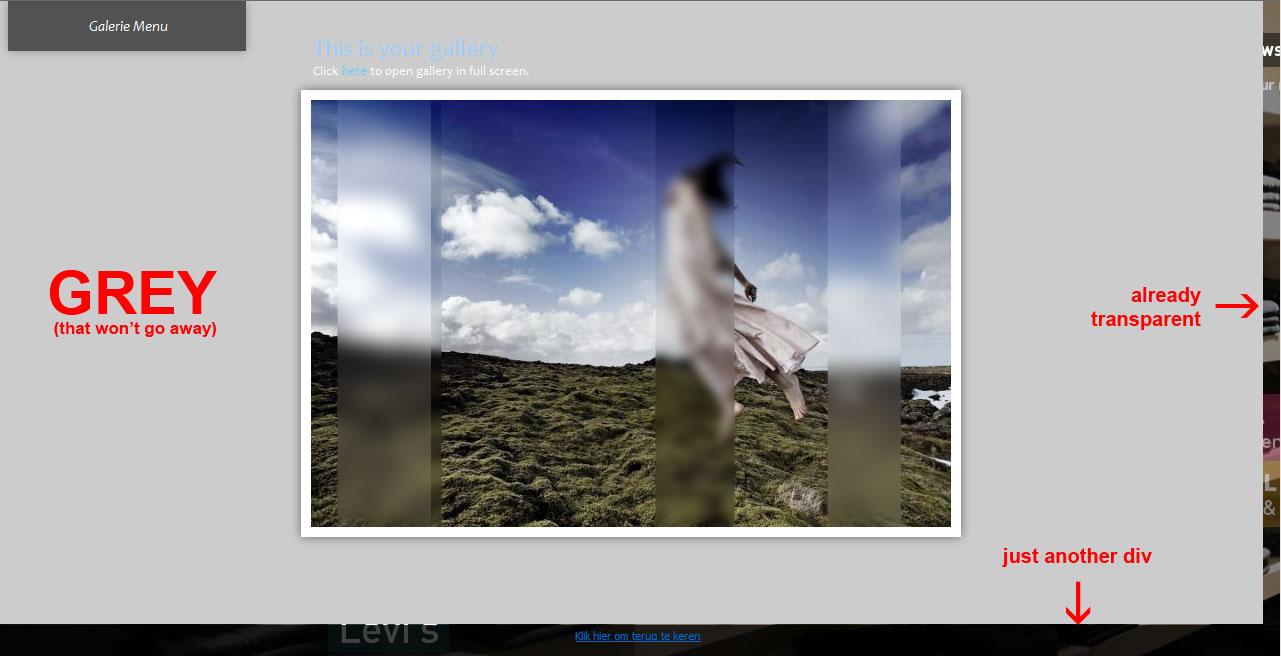
- problem.jpg (86.13 KiB) Viewed 10170 times
Re: Grey area covering the background
Posted: 12 Mar 2011, 13:41
by mjau-mjau
May I ask what the point is of having the Imagevue SWF transparent? You are trying to have some HTML show through? You are aware that the transparency wmode setting required will effect the performance of your gallery?
Re: Grey area covering the background
Posted: 14 Mar 2011, 05:20
by Trax
I want it to look "lightbox-like" so you can still see the original site in de background. This way you don't get the feeling of being redirected to another site just for some pics.
Re: Grey area covering the background
Posted: 14 Mar 2011, 08:19
by mjau-mjau
This feature will be possible in the next release. More:
viewtopic.php?f=28&t=6768&p=25269#p25269
Keep in mind, we neither recommend this or will support it. Performance will be degraded in the flash, and imagevue flash navigation items will be hovering above any other html that we have no control over.
Re: Grey area covering the background
Posted: 20 Apr 2011, 09:50
by Trax
mjau-mjau wrote:This feature will be possible in the next release. More:
viewtopic.php?f=28&t=6768&p=25269#p25269
Keep in mind, we neither recommend this or will support it. Performance will be degraded in the flash, and imagevue flash navigation items will be hovering above any other html that we have no control over.
I know, I know, I'm working on some peoples nerves now but is there any news on the next release yet?
Re: Grey area covering the background
Posted: 20 Apr 2011, 10:26
by Nick
We're working on it, looks like we won't be able to put everything in so we have to draw a line somewhere and will release a beta this weekend.
For transparent background you can hack iv-includes/templates/gallery.index.phtml and remove bgColor and set wmode to transparent.
Re: Grey area covering the background
Posted: 25 Apr 2011, 05:15
by mjau-mjau
pain wrote:For transparent background you can hack iv-includes/templates/gallery.index.phtml and remove bgColor and set wmode to transparent.
Sorry, just have to correct you pain, as this will not work because Imagevue SWF draws its own background element also. That is why a fix for this will be available in X2.7 beta coming on Tuesday.
Re: Grey area covering the background
Posted: 28 Apr 2011, 05:42
by Trax
mjau-mjau wrote:pain wrote:For transparent background you can hack iv-includes/templates/gallery.index.phtml and remove bgColor and set wmode to transparent.
Sorry, just have to correct you pain, as this will not work because Imagevue SWF draws its own background element also. That is why a fix for this will be available in X2.7 beta coming on Tuesday.
I'm sorry, my English is not so good, but do you mean Tuesday the 26th? (Two days ago?)
I really, really (really!) need this thing.

Re: Grey area covering the background
Posted: 28 Apr 2011, 12:16
by Nick
Yes 2 days ago, but due to a force majeure we missed the deadline and will release it as soon as possible.
Re: Grey area covering the background
Posted: 29 Apr 2011, 05:32
by Trax
Ok thanks for the update! I'll keep a real close eye on the updatelog.
Re: Grey area covering the background
Posted: 03 May 2011, 04:49
by Trax
pain wrote:For transparent background you can hack iv-includes/templates/gallery.index.phtml and remove bgColor and set wmode to transparent.
I did this but it is still not working. I still have a grey color in the background (#222222). Don't know how to get rid of this.
Any help is very much appreciated!
This is my gallery.index.phtml
<script type="text/javascript">
					//<![CDATA[
					var params = {
						allowScriptAccess: 'always',
						allowFullScreen: true,

						wmode: 'transparent'
					};
<?php if (count($this->vars)): ?>
						var flashVars = {
							foreground_color: '<?php echo $this->frGrColor; ?>'

						};
	<?php foreach ($this->vars as $key => $value): ?>
						flashVars.<?php echo $key; ?> = '<?php echo htmlspecialchars($value); ?>';
	<?php endforeach; ?>
<?php endif; ?>
						var attributes = {
							id: 'imagevue',
							name: 'imagevue'
						}

<?php if ($this->enabledHTML): ?>
						swfobject.addDomLoadEvent(function () {
							var playerVersion = swfobject.getFlashPlayerVersion();
							if (playerVersion.major < 9) {
								location.href = '?' + SWFAddress.getPath();
							}
						});
<?php endif; ?>

						swfobject.embedSWF("<?php echo IV_PATH; ?>imagevue2.swf", "imagevue", "100%", "100%", "8.0.0", "<?php echo IV_PATH; ?>expressInstall.swf", flashVars, params, attributes);
						if (swfmacmousewheel && navigator.appName != 'Microsoft Internet Explorer')
						    swfmacmousewheel.registerObject(attributes.id);
					// ]]>
				</script>
Re: Grey area covering the background
Posted: 04 May 2011, 02:38
by mjau-mjau
You need to add the following
flashvar to the document, with the setting "
transparent: true":
var flashVars = {
	foreground_color: '<?php echo $this->frGrColor; ?>',
	background_color: '<?php echo $this->bkGrColor; ?>',
	transparent: true
};
From the release notes:
mjau-mjau wrote:Added support for Flash transparency. You can use this feature to display Html behind the Imagevue gallery, although we do not recommend this because of performance issues and obvious placement issues. To apply this feature, you need to add wmode: 'transparent' and flashvar: transparent: true into your document. Normally this is achieved by editing iv-includes/templates/index.gallery.phtml unless you have a custom html document.