Page 1 of 1
Popup x3 max-width
Posted: 01 Nov 2017, 12:52
by mat321
Hi,
Just make a try display a video link in the x3pop and and big screen th popup is small, in firebug i saw that max-width is 1030px !!
Can i change this param in admin or do i have to in css ?
Why this param is max 1030px ?
Thanks
css code :
.x3-popup-iframe {
- max-width: 1030px;
}
Re: Popup x3 max-width
Posted: 02 Nov 2017, 02:22
by mjau-mjau
I am not sure what you are trying to do. If you are using a video, it shouldn't use x3-popup-iframe at all ... Go here
https://demo.photo.gallery/examples/plugins/popup/ and click the VIDEO/YOUTUBE example, and there is no width limit. If you are using a video, just link to the video source file, no need to add an iframe.
In same link as above, there is also references on how to use custom
data-popup-class for the X3 popup. There is a 1030px width on the default iframe popup class, because unlimited width text is not readable:
BAD:

GOOD:

Re: Popup x3 max-width
Posted: 03 Nov 2017, 04:45
by mat321
Hi thanks for info,
i use an iframe link cause my video have a self url, for example :
http://www.teamlescollets.com/video2017/annot/
I use this because of pointing url video directly cause some problem on some mobile device that download the video and play, little bit confusing for users so i use video link with html5 player.... it works fine :
http://www.teamlescollets.com/Vid%C3%A9os/divers/
the way it open youtube is cool on your example but my video open when click on thumblail so i don't success to make the same thing like you, onway i find is to use x3popup....
is there oher solution please ?
you can check this page :
http://www.teamlescollets.com/Vid%C3%A9os/divers/
First is youtube video and other are iframe....
Let me know please !!! thankks
Re: Popup x3 max-width
Posted: 03 Nov 2017, 08:59
by mjau-mjau
The simple solution is to add this to settings > custom > custom CSS:
.x3-popup-iframe {
  max-width: none;
}
You could also assign a different CSS class instead, as I tried to point out in my previous post.
Re: Popup x3 max-width
Posted: 03 Nov 2017, 09:49
by mat321
Thanks, it works, just to be more precise, i will try to add custom css classe but please can you tell me where is the way to assign a class to a folder or just an image please
Thanks
Re: Popup x3 max-width
Posted: 03 Nov 2017, 22:46
by mjau-mjau
There are examples on
this page about how to use a custom class for the POPUP.
<a data-popup-content="Howdy! This content is wrapped inside an element with a <em>custom_css_class</em>." data-popup-class="custom_css_class">Custom</a>
You don't assign a popup class to a folder or image ... You assign a popup class to the link that opens the popup.
PS! You don't really need to assign a custom class, unless you want to add any specific styling to the popup.
Re: Popup x3 max-width
Posted: 04 Nov 2017, 10:27
by mat321
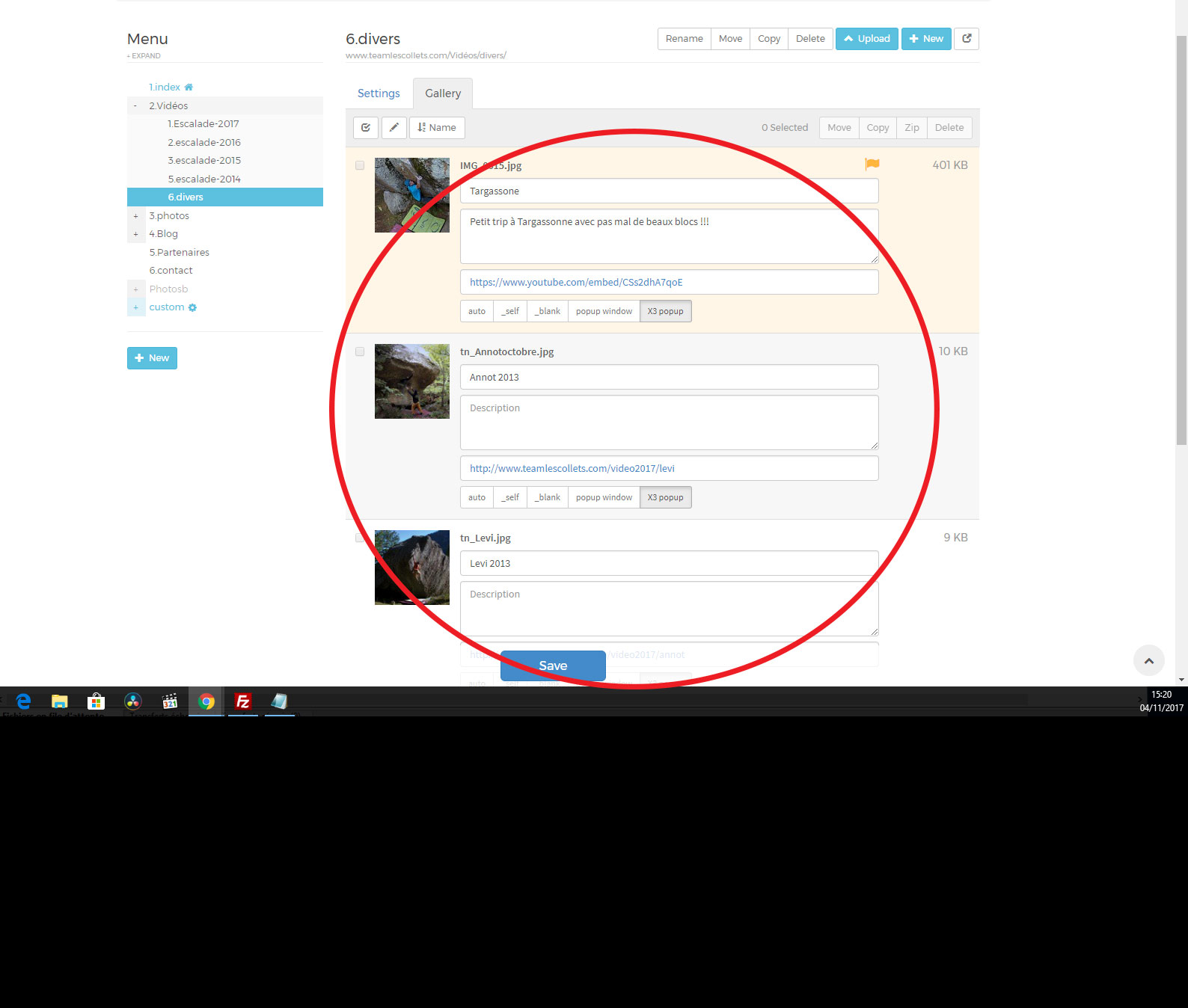
yes i know but i'm not on custom html page, i'm on gallery so really i don't see how to apply class to an popup in the gallery... please let me know...
see this image to understand :
www.teamlescollets.com/aa.jpg
My idea is like this page is all my video, i want x3popup have no width limit for this page but have the classic 1030px on other page.
The page in question is this one :
http://www.teamlescollets.com/Vid%C3%A9os/divers/
Re: Popup x3 max-width
Posted: 05 Nov 2017, 22:57
by mjau-mjau
Ok, so do like this: Go to Panel > Settings > Custom > Custom CSS, and create a class:
.popup-wide .x3-popup-iframe {
  max-width: none;
}
Now, for the pages where you want popups that show iframe to have no width limit, go to page settings > details > body classes, and add your "popup-wide" class.

Re: Popup x3 max-width
Posted: 06 Nov 2017, 09:38
by mat321
Thanks works like a charm !!!