Page 1 of 1
Sharpen image
Posted: 06 Feb 2021, 17:17
by Dane
Hi
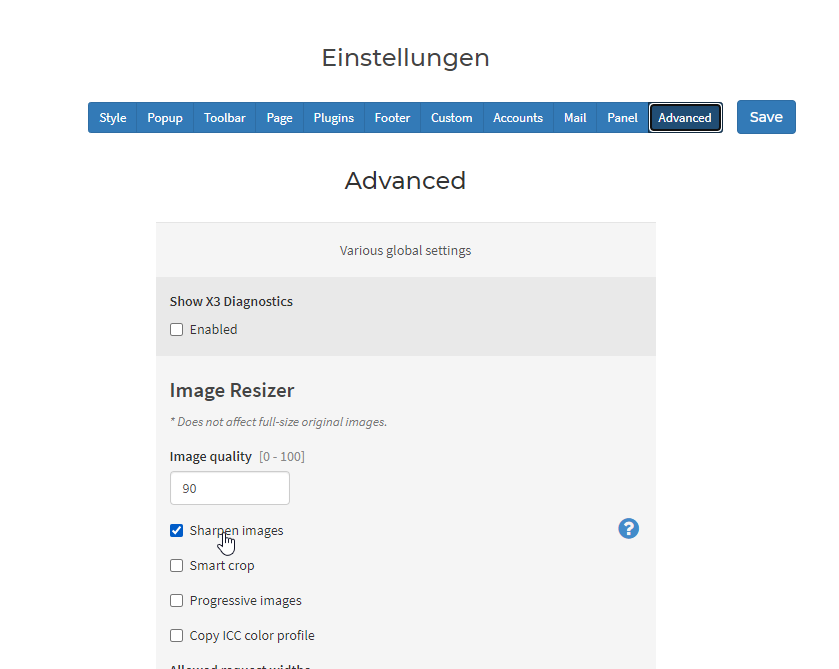
Would it be possible to adjust the sharpening of the images?
- 2021-02-06 23_15_55-X3 Panel.png (23.26 KiB) Viewed 5496 times
Thank you!
Re: Sharpen image
Posted: 06 Feb 2021, 22:25
by mjau-mjau
Sorry, no. Unfortunately, this is just server/PHP and there are no "sharpen" features like in Photoshop or anything. We apply a sharpening feature from a matrix function, automated based on the dimensions of image. I have tested it in depth, with results clearly superior to the otherwise blurry results of PHP image resizing. You could try to adjust the function, but it's kinda pointless, especially since the resized images will resize in browser also adding additional distortion. Honestly, the "sharpen" feature basically just makes sure the resized images remain relatively sharp, and should perhaps not be an option in the first place.
/app/parsers/slir/index.php
// sharpen (auto)
 private function sharpen($image){
$final = sqrt($this->render['dst_w'] * $this->render['dst_h']) * (750.0 / sqrt($this->render['crop_width'] * $this->render['crop_height']));
$result = max(round(52 + -0.27810650887573124 * $final + .00047337278106508946 * $final * $final), 0);
if(!imageconvolution($image, array(
array(-1, -2, -1),
array(-2, $result + 12, -2),
array(-1, -2, -1)
), $result, 0)) $this->error('Failed to sharpen image.', 500);
}
You could perhaps tweak the code, but it's not worth it.
https://www.php.net/manual/en/function. ... php#104006
Re: Sharpen image
Posted: 07 Feb 2021, 14:08
by Dane
Hi Karl, thanks for the info. I already sharpen my base images extensively. But with the reduced previews, that somehow gets lost. I would have hoped that one could effectively help here.
If you think it won't do much good, I won't do it either.
Thanks!
Re: Sharpen image
Posted: 07 Feb 2021, 22:34
by mjau-mjau
Dane wrote:I already sharpen my base images extensively.
How sharp your originals are is irrelevant in this case. The point of "sharpen", is to prevent blurry
resized images, and the images would become blurry regardless of how sharp your originals are. Unfortunately, default PHP image resizing causes extensive blurriness (for some reason), and we need to counter-act that with an automated sharpen feature ... The RESULT is that the resized (downsized) images resemble the originals.
Dane wrote:But with the reduced previews, that somehow gets lost. I would have hoped that one could effectively help here.
I guess what you are asking, is that you want to actually INCREASE the sharpening. Keep in mind, your resized images are already compressed (JPG) and scaled down extensively, casuing some loss of detail, and then resized images will further scale in browser. If you try with vs without the "sharpen" feature, you will already see it makes a substantial difference, but it's pointless to overdo it, causing unnatural graininess.
Keep in mind, the "sharpen" effect applies on a rather blurry resized image (not the original), so it's already lost lots of detail which you can't get back just by sharpening it.
Re: Sharpen image
Posted: 08 Feb 2021, 06:23
by Dane
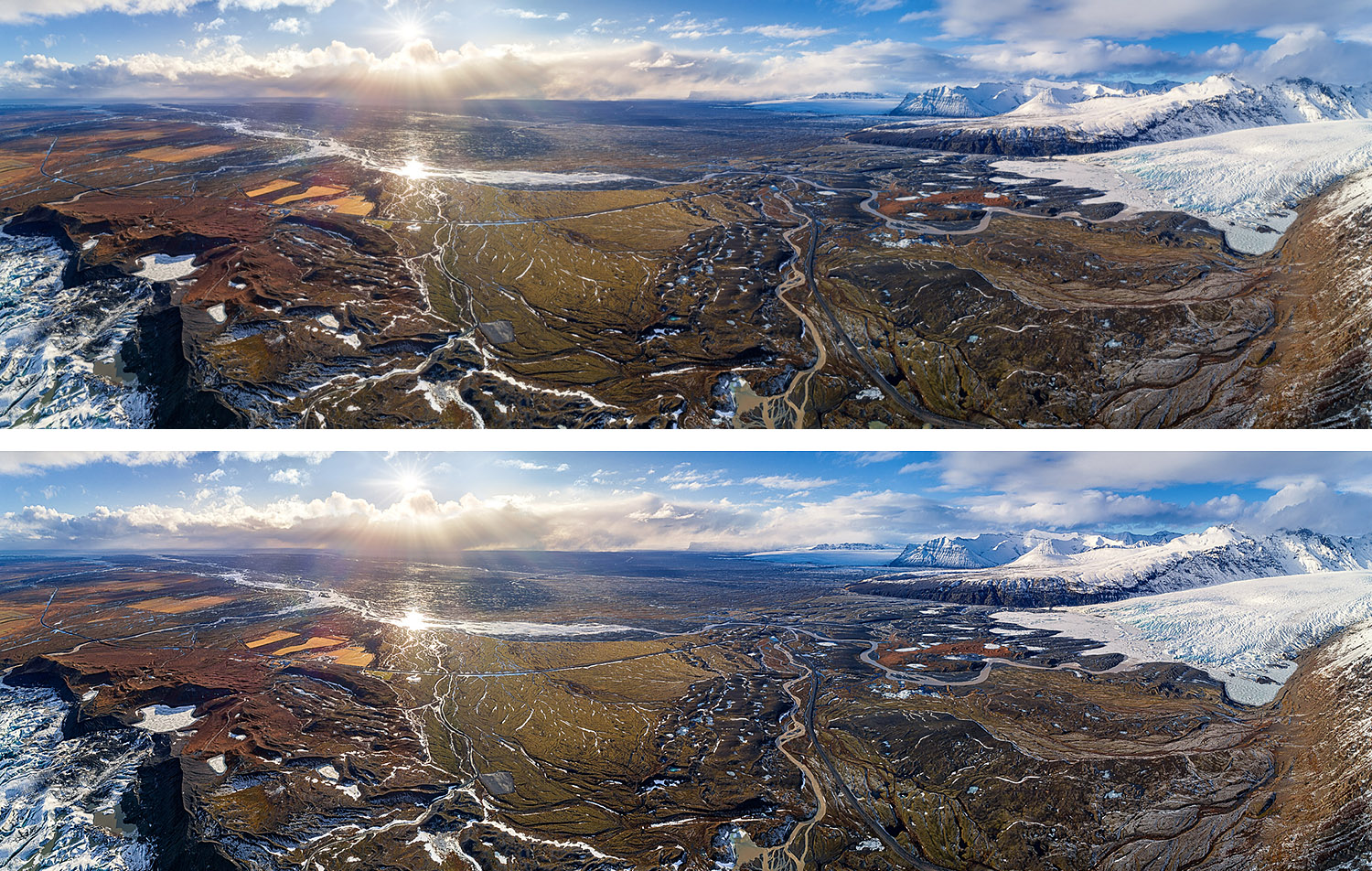
Yes, it is true that reduced photos also lose details accordingly. But a re-sharpening should always be done after downsizing. Anyway, this is the rule in photography. And it does bring so much.
Look at my example with your fine structures. The image was resized from 3360px to 1500px on the long side. The upper image is unchanged, the lower one was sharpened.
- DJI_0423-HDR-Pano_vergleich.jpg (688.49 KiB) Viewed 5482 times
Re: Sharpen image
Posted: 08 Feb 2021, 21:39
by mjau-mjau
Indeed, and that's why we have a sharpening feature in place, unlike most other galleries. All respect to photographers who wish to control the quality of their "original" images, which they can do before they upload to X3. You essentially have full control of quality, compression, dimensions and sharpness when you resize in preparation for uploading. When you sharpen an original after resizing slightly, you still have most of the photographic detail which will be used in the sharpening process. Besides, when you resize on quality desktop application, blurriness is already minimal (and pre-optimized from good applications).
However, this is a totally different arena than X3 "resized images", which are small, compressed (JPG), and must be produced by the server-based PHP image library, which causes the extensive blurriness in the first place. You could try yourself by disabling the "sharpen" feature, uploading an image, checking the resized version, re-enable sharpen, then uploading the same image with a different name and comparing side by side. You will see the first image seems extremely blurry, and from that result, X3 needs to "sharpen" the image ... I have been testing this myself in depth, and can't possibly increase the pixelation more, as many results looked fake / over-pixelated / over-contrasted. Add to the fact that images are resized in browser, which causes some blurriness, and it's just a "can of worms". You came from Koken? I'm pretty sure this app did not do any sharpening, as "sharpen" is not really PHP feature, but simulated from an imageconvolution function (see code posted earlier). This is the web, images are highly compressed and scaled in browser, so you can't pursue the same level of perfection as your original images.
Re: Sharpen image
Posted: 09 Feb 2021, 02:20
by Dane
Hi Karl,
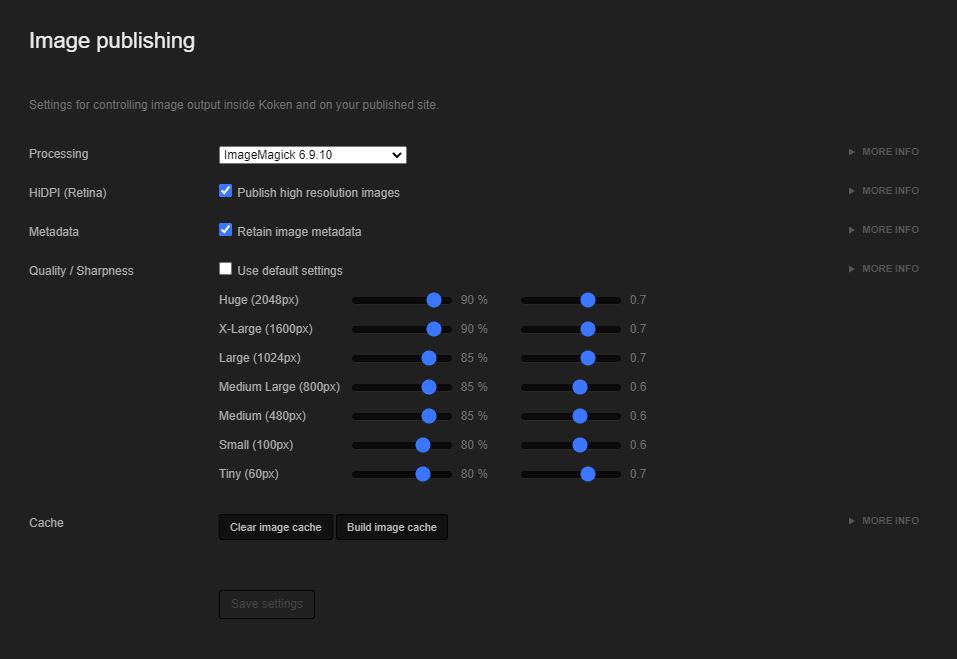
Thanks for the explanation. Yes, i came from Koken. I don't know about this, but here a script is used for image processing. "ImageMagick", and others to choose from.
- 2021-02-09 08_15_02-Koken.jpg (35.2 KiB) Viewed 5476 times
And you have there more settings for the sharpening.
- 2021-02-09 08_15_02-Koken.jpg (35.2 KiB) Viewed 5476 times
Re: Sharpen image
Posted: 09 Feb 2021, 03:15
by mjau-mjau
Right. Except for "GD bundled", all those in the list are image processing applications that must be installed on server (by the hosting). I will consider adding optional support for
ImageMagick in a future release. Since it's available only on some servers, I can't use this by default.
Re: Sharpen image
Posted: 09 Feb 2021, 03:19
by Dane
Thank you for considering this.
Re: Sharpen image
Posted: 09 Feb 2021, 04:29
by cyman_de
That' s great, that would be really helpful.
Re: Sharpen image
Posted: 19 Feb 2021, 06:19
by tbp
I'd greatly appreciate ImageMagick as well - and I am also a former Koken user :wink: