Custom link button
Posted: 08 Dec 2020, 02:42
- 스크린샷 2020-12-08 오후 4.39.32.png (9.4 KiB) Viewed 2348 times
I'd like to add a custom link(custom icon) to this button
What should I do?
plz~
Yeah, I got it.mjau-mjau wrote: Sorry, but that is not a public button bar ... It's for a few X3 features only. At minimum, you would have to write some custom Javascript code to inject your custom button. Why not use the toolbar (left side of screen) instead? That was made to be customized with your own links.
No. The audio player is a unique X3-plugin, and is not related to simple CUSTOM LINKS that you place in toolbar. Besides, the toolbar is almost only used for social media SHARING. You define all your toolbar-links from Settings > Toolbar, and that cannot be combined with an advanced plugin like audio player.TristanJo wrote:Then can I move the music player and chatting button to the left(toolbar)?
Do you have your new icon in SVG format then? Or what format? And you want to add the icon into the toolbar?TristanJo wrote:And please let me know how to put the custom icon? (my icon is not found in the Font-Awesome)
Yes, I have SVG file.mjau-mjau wrote:No. The audio player is a unique X3-plugin, and is not related to simple CUSTOM LINKS that you place in toolbar. Besides, the toolbar is almost only used for social media SHARING. You define all your toolbar-links from Settings > Toolbar, and that cannot be combined with an advanced plugin like audio player.TristanJo wrote:Then can I move the music player and chatting button to the left(toolbar)?
Do you have your new icon in SVG format then? Or what format? And you want to add the icon into the toolbar?TristanJo wrote:And please let me know how to put the custom icon? (my icon is not found in the Font-Awesome)
It will require custom CSS to integrate the custom icon, after you have the icon ready. Why not just use the font-awesome comment icon? On mouse hover, you can add the title "talk" in the toolbar ... Simple solution.
Yes, I have SVG file.TristanJo wrote:mjau-mjau wrote:No. The audio player is a unique X3-plugin, and is not related to simple CUSTOM LINKS that you place in toolbar. Besides, the toolbar is almost only used for social media SHARING. You define all your toolbar-links from Settings > Toolbar, and that cannot be combined with an advanced plugin like audio player.TristanJo wrote:Then can I move the music player and chatting button to the left(toolbar)?
Do you have your new icon in SVG format then? Or what format? And you want to add the icon into the toolbar?TristanJo wrote:And please let me know how to put the custom icon? (my icon is not found in the Font-Awesome)
It will require custom CSS to integrate the custom icon, after you have the icon ready. Why not just use the font-awesome comment icon? On mouse hover, you can add the title "talk" in the toolbar ... Simple solution.
Yes, if i can't customize the right chat button.mjau-mjau wrote: So, you want that icon in the left toolbar?
And what happens when it's clicked?
I already told you, the right bottom buttons are for native X3 plugins. In your case, you don't want the X3 chat plugin and you don't even want the same icon, so what's to customize?TristanJo wrote:Yes, if i can't customize the right chat button.
Yes, then tell me the code so I can put it on the left.(costom svg)mjau-mjau wrote:I already told you, the right bottom buttons are for native X3 plugins. In your case, you don't want the X3 chat plugin and you don't even want the same icon, so what's to customize?TristanJo wrote:Yes, if i can't customize the right chat button.
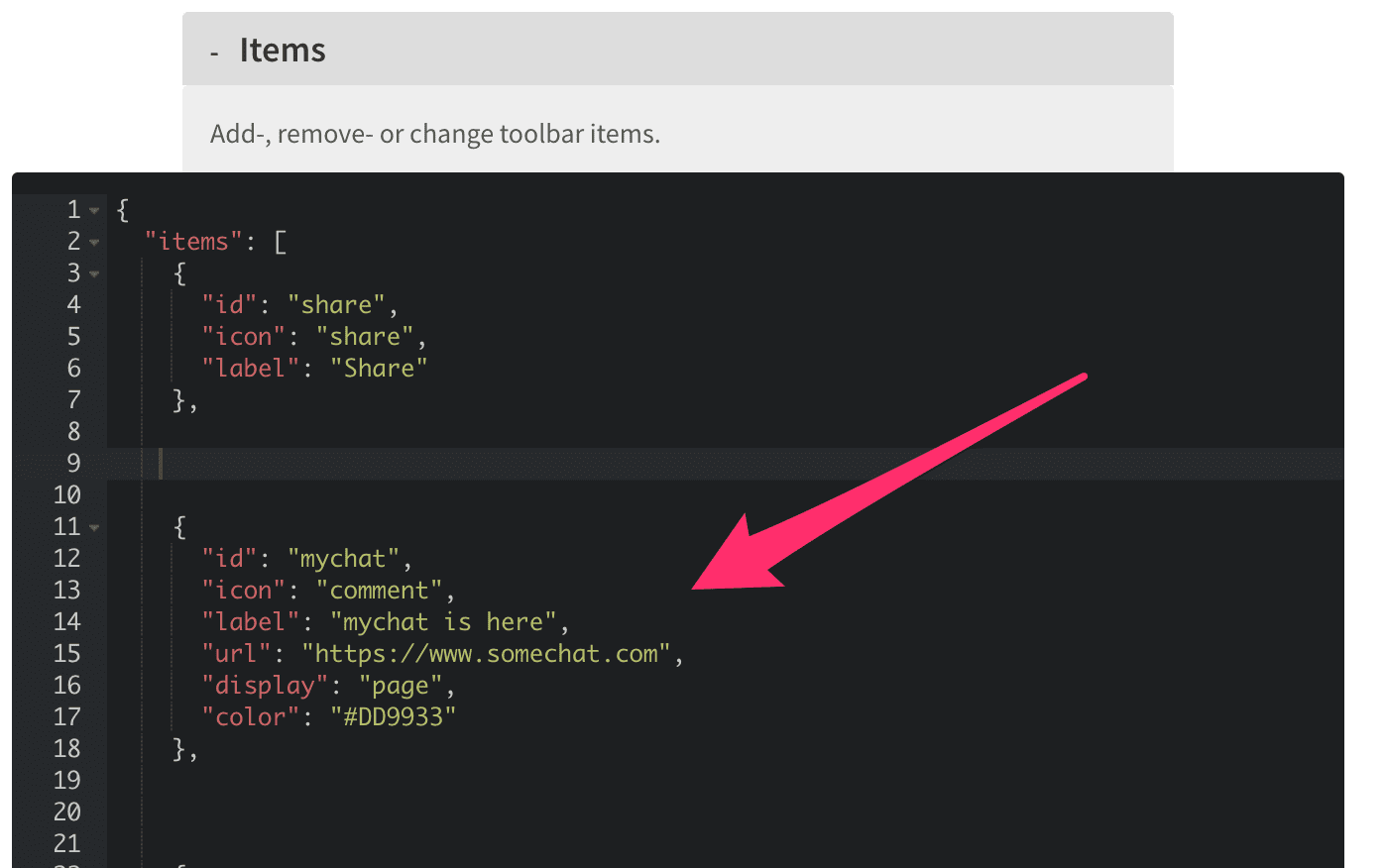
You can use the TOOLBAR (left) to add custom links. If you need to add your own icon bottom right, you can do that with custom CSS (and maybe some javascript), but not using the existing X3 plugin buttons.
{
 "id": "mychat",
 "icon": "comment",
 "label": "mychat is here",
 "url": "https://www.somechat.com",
 "display": "page",
 "color": "#DD9933"
},
Karl ~ Thanks a lot.mjau-mjau wrote: Optionally, you could use some Javascript to add your own custom chat button with custom icon at bottom right. I can't do that for you though. I would charge $25 for a couple of hours work.
thank you~ karl~mjau-mjau wrote: Ok, it shouldn't be too difficult. Do you have the "talk" icon available for me? Also, what will happen when clicking the button? Does it open a new window to the "talk" service? Or something else?
<!-- kakao talk channel counseling button -->
<a href="javascript:void plusFriendChat()" class="kakaoChat">
    <img src="image URL" width="72px" height="72px">
</a>

<style>
.kakaoChat {
    position: fixed;
    z-index: 999;
    right: 15px; /* Position */
    bottom: 20px; /* Position */
}
</style>

<script type='text/javascript'>
    //<![CDATA[
    // kakao talk app JavaScript key.
    Kakao.init('JavaScript key');
    function plusFriendChat() {
        Kakao.Channel.chat({
              channelPublicId: 'ID' // kakao talk channel ID
        });
    }
    //]]>
</script>/* I don't know what this is for, but assume it's for the chat window that loads */
.kakaoChat {
position: fixed;
z-index: 999;
right: 15px; /* Position */
bottom: 20px; /* Position */
}
/* for the custom button */
#button_talk > span:after {
content: 'Talk';
}
#button_talk img {
width: 24px;
}// I don't know what this is for ...
function plusFriendChat() {
Kakao.Channel.chat({
channelPublicId: 'ID' // kakao talk channel ID
});
}
// X3 is loaded
function x3_load(){
setTimeout(function(){
// get buttons container
var plugin_buttons = document.getElementById('x3_plugin_buttons');
if(!plugin_buttons) return;
// insert new custom button with custom icon
plugin_buttons.insertAdjacentHTML('beforeend', '<button id="button_talk" style="opacity:1"><span></span><img src="/content/custom/files/images/kakao.png"></button>');
var button_talk = document.getElementById('button_talk');
// click event for custom button. I see Kakako.init(), which surely requires some other Javascript ...
button_talk.addEventListener('click', function(){
// console.log('click');
Kakao.init('JavaScript key');
});
}, 1000);
}