metallissimus wrote:I would argue that, practically speaking, it is:
https://caniuse.com/webp (Most obvious when looking at the "usage relative" chart.)
I said it's not supported in all browsers, but of course most yes. The point here, is that if you choose webp-only, you will be breaking the website for a large quantity of visitors. Let's see:
https://caniuse.com/webp
For instance, webp isn't even supported on iOS until version 14. Even my
Files Gallery app (made for modern browsers), needs to be created with backwards compatibility to iOS 10 and CSS variables (because many are using iphones that can't update beyond). And hey, iPhone is supposed to be one of the most powerful/modern/expensive phones.
Anyway, this is besides the point. If you want to support all devices (like now), you would need to BOTH jpg and webp, which is not a useful approach. It would require lots of processing and 2x storage. Or let's say you want to ignore devices that don't support webp ... What mechanism is going to convert all your original jpg images to webp? This is a heavy process, which would then need to delete all your original JPG images while converting to webp. Also, as noted in my previous reply, quality would deteriorate when converting already-compressed jpgs re-compressed to webp. Why would anyone do that if the quality gets worse, and the file size will likely be approximately the same? Surely that makes absolutely no sense.
If anything, you would need to UPLOAD the files as WEBP directly from your desktop to avoid re-compression. In other words, you would need to resize/convert your original photo files (from the camera etc) to wepb in a single process, so that quality does not degrade. Else what's the point?
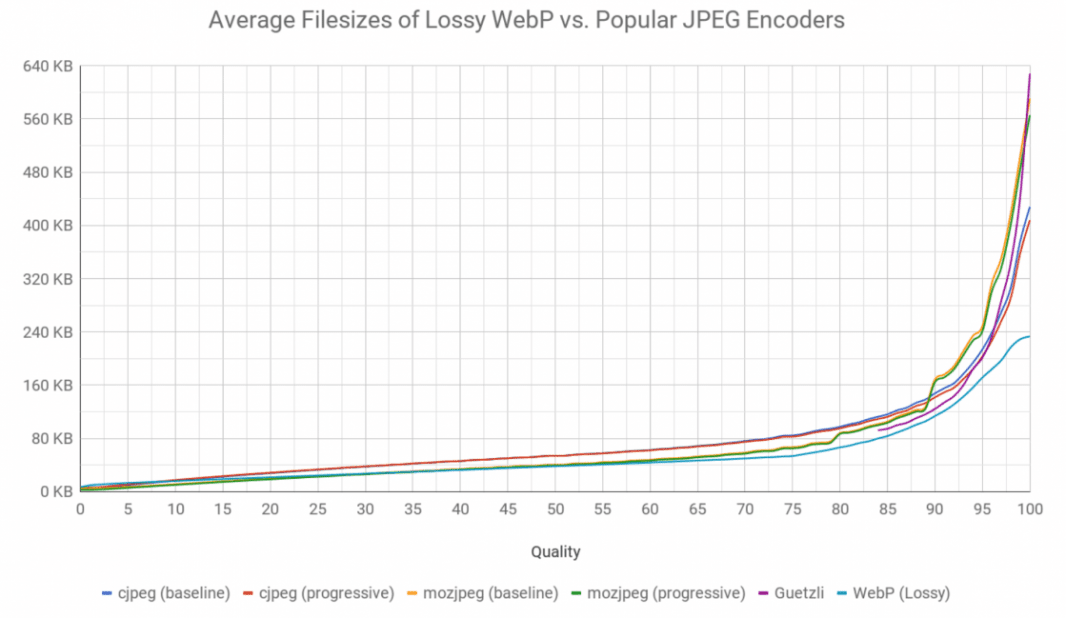
Then of course, it still leaves the fact that webp simply has no benefit in file size for photographic style images. I have tested this in depth myself.
For my landing pages I do use webp and I have about 30% smaller files than jpgs that went through ImageOptim (lossless).
How do you know that the webp images aren't compressed more though? The compression "level" isn't identical. Also what kinda images is this? Apart from Google's own articles on the subject, I think you will struggle to find any objective posts that suggest anything like that level.
I use webp on
www.photo.gallery for many years (the top screenshot photo), but for one reason and one reason alone: Webp supports lossy compression alongside 24-bit alpha layers (transparency). This is not possible with PNG or JPG. I would also use webp for graphics (like logos). For photography, no, at best minimal difference.
https://processwire.com/talk/topic/2680 ... g-sources/
https://stackoverflow.com/questions/522 ... allest-one
I believe WebP qualities are inflated about 7 points, i.e., to match JPEG quality 85 one needs to use WebP quality 92 (when using the cwebp tool).
https://siipo.la/blog/is-webp-really-better-than-jpeg
I used to use
Cloudflare Polish for a while (paid add-on), and one of it's features was to dynamically convert jpg images to webp, for browsers that support webp. However, it would only do this if the resulting webp file size was smaller than the jpg. In my case, since my jpg's were already compressed with a good tool, I found that Cloudflare virtually NEVER output my files as webp. It even stated this in the headers of the file response. I cancelled in the end.
https://developers.cloudflare.com/image ... h/no-webp/
https://community.cloudflare.com/t/webp ... g/290865/5
As noted, webp is great for graphic-style images, transparency, lossless images. However, for photo-style images, the difference is at best minimal.