Hi guys,
i'm wondering if there is webp conversion support, i want to know if i can upload jpg image and software convert and use an webp version, does not find info about this ?
Thanks
X3Photo Gallery Forums
X3 Photo Gallery Support Forums
Webp support8 posts

Re: Webp support
Although this question is slightly more valid today than it was when asked more than a year ago, I don't see much point in this. First of all, webp is NOT supported in all browsers, so it means the app would need to serve jpg and webp images depending on the browser. This would then mean that you would need to store BOTH jpg and webp versions of all your images on the server, which would require 2x storage space, and would reduce cache efficiency. Then, if you are going to convert already-compressed JPG images to WEBP, it will require re-compression and the images will degrade in quality, possibly without even reducing file size. Finally, let's looks at WEBP vs JPG file size efficiency:mat321 wrote:i'm wondering if there is webp conversion support, i want to know if i can upload jpg image and software convert and use an webp version, does not find info about this ?
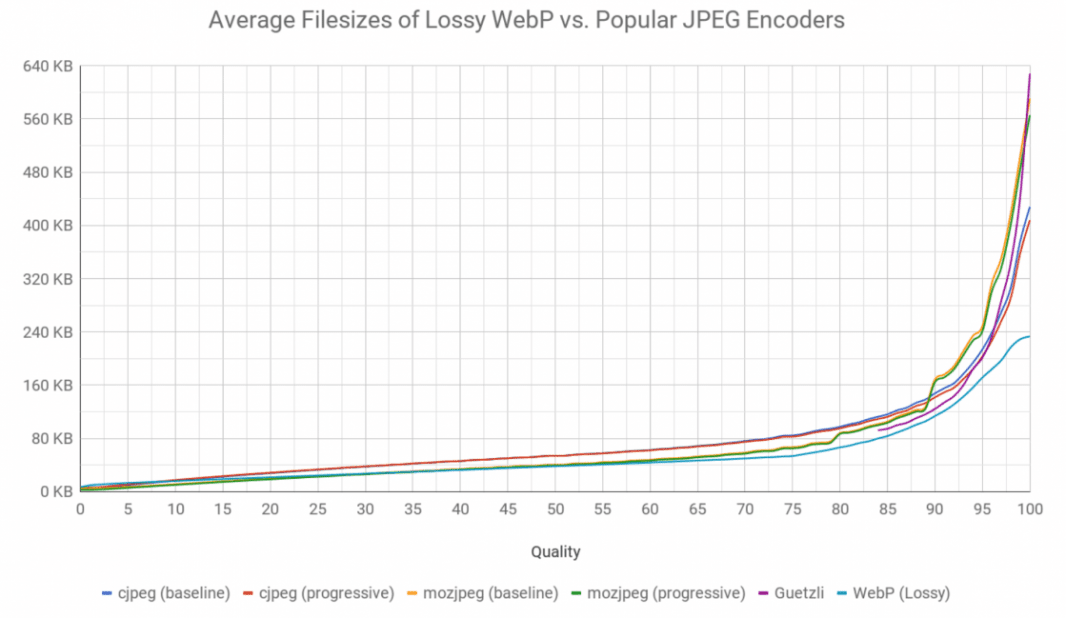
The difference is negligible. As I wrote in my blog post about https://www.photo.gallery/blog/image-size-quality-photo-gallery-websites/:
In conclusion, it doesn't seem beneficial in any way. If anything, it will cause more issues than it solves.Some of you may have heard of the webp image format from Google, and are wondering how this performs vs JPG. Tests show that the webp format has minimal benefit when it comes to photographic images. Besides, webp is not yet supported in many browsers. The main advantage of the webp format, is how it outperforms GIF and PNG for graphic style images.
Re: Webp support
Hi thanks a lot, very interesting responses !!
-

-
metallissimus
Experienced
- Posts: 365
- Joined:
Re: Webp support
I would argue that, practically speaking, it is: https://caniuse.com/webp (Most obvious when looking at the "usage relative" chart.) For my landing pages I do use webp and I have about 30% smaller files than jpgs that went through ImageOptim (lossless).mjau-mjau wrote: First of all, webp is NOT supported in all browsers
But I agree that it's probably not worth the extra effort in a lot of use cases.
Re: Webp support
I said it's not supported in all browsers, but of course most yes. The point here, is that if you choose webp-only, you will be breaking the website for a large quantity of visitors. Let's see:metallissimus wrote:I would argue that, practically speaking, it is: https://caniuse.com/webp (Most obvious when looking at the "usage relative" chart.)
https://caniuse.com/webp
For instance, webp isn't even supported on iOS until version 14. Even my Files Gallery app (made for modern browsers), needs to be created with backwards compatibility to iOS 10 and CSS variables (because many are using iphones that can't update beyond). And hey, iPhone is supposed to be one of the most powerful/modern/expensive phones.
Anyway, this is besides the point. If you want to support all devices (like now), you would need to BOTH jpg and webp, which is not a useful approach. It would require lots of processing and 2x storage. Or let's say you want to ignore devices that don't support webp ... What mechanism is going to convert all your original jpg images to webp? This is a heavy process, which would then need to delete all your original JPG images while converting to webp. Also, as noted in my previous reply, quality would deteriorate when converting already-compressed jpgs re-compressed to webp. Why would anyone do that if the quality gets worse, and the file size will likely be approximately the same? Surely that makes absolutely no sense.
If anything, you would need to UPLOAD the files as WEBP directly from your desktop to avoid re-compression. In other words, you would need to resize/convert your original photo files (from the camera etc) to wepb in a single process, so that quality does not degrade. Else what's the point?
Then of course, it still leaves the fact that webp simply has no benefit in file size for photographic style images. I have tested this in depth myself.
How do you know that the webp images aren't compressed more though? The compression "level" isn't identical. Also what kinda images is this? Apart from Google's own articles on the subject, I think you will struggle to find any objective posts that suggest anything like that level.For my landing pages I do use webp and I have about 30% smaller files than jpgs that went through ImageOptim (lossless).
I use webp on www.photo.gallery for many years (the top screenshot photo), but for one reason and one reason alone: Webp supports lossy compression alongside 24-bit alpha layers (transparency). This is not possible with PNG or JPG. I would also use webp for graphics (like logos). For photography, no, at best minimal difference.
https://processwire.com/talk/topic/2680 ... g-sources/
https://stackoverflow.com/questions/522 ... allest-one
https://siipo.la/blog/is-webp-really-better-than-jpegI believe WebP qualities are inflated about 7 points, i.e., to match JPEG quality 85 one needs to use WebP quality 92 (when using the cwebp tool).
I used to use Cloudflare Polish for a while (paid add-on), and one of it's features was to dynamically convert jpg images to webp, for browsers that support webp. However, it would only do this if the resulting webp file size was smaller than the jpg. In my case, since my jpg's were already compressed with a good tool, I found that Cloudflare virtually NEVER output my files as webp. It even stated this in the headers of the file response. I cancelled in the end.
https://developers.cloudflare.com/image ... h/no-webp/
https://community.cloudflare.com/t/webp ... g/290865/5
As noted, webp is great for graphic-style images, transparency, lossless images. However, for photo-style images, the difference is at best minimal.
-
-
metallissimus
Experienced
- Posts: 365
- Joined:
Re: Webp support
How is less than 1% (Internet Explorer and iOS <14) "a large quantity"? Looking at my own websites' stats, in 2024 there were about 0.2% visitors that would have been affected.mjau-mjau wrote: if you choose webp-only, you will be breaking the website for a large quantity of visitors. Let's see:
https://caniuse.com/webp
TBH I don't know if they are more compressed. But I can barely make out differences between the optimised jpg and the webp created from that same file (which interestingly seems to be against the usual advice). File size reduction varies a lot between different kinds of images. If there is a lot of detail it's only about 10%. Portraits with a very blurry background are about 40% smaller in webp. Files are already rather small with 1200px width.How do you know that the webp images aren't compressed more though? The compression "level" isn't identical. Also what kinda images is this?
As I said before, I agree it's extra work and may not be worth the effort in some – maybe even most – cases. I am not advocating some automatic conversion in X3 (or more realistically X4). Just sharing my personal experience which isn't as negative as yours seems to be.
Re: Webp support
I don't think we need to argue about this. More than most developers, I personally like to push new technologies and ignore old browsers. Always was since the first release of X3. I'm not sure where you get 0.2% from though ... It clearly states 96.52%, which leaves 3.5% without support. It's not the point anyway. Why exclude that 3.5% when it basically can't be done, and at best serves no purpose.metallissimus wrote:How is less than 1% (Internet Explorer and iOS <14) "a large quantity"? Looking at my own websites' stats, in 2024 there were about 0.2% visitors that would have been affected.
Well, that's the point. You claimed it was 30% smaller files, but you can't know that if the compression is higher on webp for the same compression input "value". We are speaking about comparing webp and jpg at the same level of visual quality vs their file size. That is never going to be 30%, and you won't find any tests that prove anything like this.metallissimus wrote:TBH I don't know if they are more compressed. But I can barely make out differences between the optimised jpg and the webp created from that same file (which interestingly seems to be against the usual advice).
I think this post explains what you are experiencing (see paragraph #2):
https://stackoverflow.com/a/52247501/3040364
1. JPEG may compress better than WebP. WebP has problems with blurring out of the details, low-resolution color, and using less than full 8 bits of the color space. In the higher end of quality range, a well-optimized JPEG can be similar or better than WebP.
2. However, most of file size differences in modern lossy codecs are due to difference in quality. The typical difference between JPEG and WebP at the same quality is 15%-25%, but file sizes produced by each codec can easily differ by 10× between low-quality and high-quality image. So most of the time when you see a huge difference in file sizes, it's probably because different tools have chosen different quality settings (and/or recompression has lost fine details in the image, which also greatly affects file sizes). Even visual difference too small for human eye to notice can cause noticeable difference in file size.
It's not only that it's extra work and that it provides arguably no benefit. It's also that it basically can't be done from X3 in any logical way. How would we do it? Convert your already-compressed JPG's to re-compressed WEBP's? The quality would degrade, because it would already inherit the JPG compression, and then apply it's own compression on top. And then, if you want to try to keep the same visual quality, I doubt very much that the file size would shrink.metallissimus wrote:As I said before, I agree it's extra work and may not be worth the effort in some – maybe even most – cases. I am not advocating some automatic conversion in X3 (or more realistically X4). Just sharing my personal experience which isn't as negative as yours seems to be.
Anyway, your input is much appreciated metallissimus as always :blush: I think you just hit the nail on the head with one of my pet peeves that I like to go on and on about ...
-
-
metallissimus
Experienced
- Posts: 365
- Joined:
Re: Webp support
Just to clarify the stats I was talking about:
Visitor logs from my own websites, where I checked for browsers that don't support webp.mjau-mjau wrote:I'm not sure where you get 0.2% from though
Oh wow, I only now found that number on caniuse – it's kinda easy to miss up there in the corner when you are focussed on the extensive charts :upside_down:clearly states 96.52%