Page 1 of 1
Backend Gallery View: Sort by date not correct
Posted: 01 May 2016, 14:10
by netmax
Hi,
I love the new sort-by-date feature and it seems to work quite well in the frontend.
But in the backend (grid view) it appears as if the sorting by date arranges the pictures by upload date and not by EXIF date. Also I did not make it to switch between ascending and descending here.
Switching to "Custom" seems to arrange the pictures by EXIF date.
This is not totally clear to me and might be reviewed?
Marco
Re: Backend Gallery View: Sort by date not correct
Posted: 01 May 2016, 14:24
by mjau-mjau
netmax wrote:But in the backend (grid view) it appears as if the sorting by date arranges the pictures by upload date and not by EXIF date. Also I did not make it to switch between ascending and descending here.
Since the panel gallery listing is not really related to SORTING in the frontend, there is no built-in support for EXIF sorting in the panel. I am sure this can be included in a future release (added to our todo list).
netmax wrote:Switching to "Custom" seems to arrange the pictures by EXIF date.
This would have to be a coincidence somehow.
Re: Backend Gallery View: Sort by date not correct
Posted: 11 Jun 2020, 04:32
by pede
mjau-mjau wrote:
I am sure this can be included in a future release (added to our todo list).
Is there any progress here? I would also appreciate it if photos could be sorted automatically by date of shooting. With many photos in the folder, manual sorting is very time-consuming.
Re: Backend Gallery View: Sort by date not correct
Posted: 11 Jun 2020, 05:30
by mjau-mjau
pede wrote:Is there any progress here? I would also appreciate it if photos could be sorted automatically by date of shooting. With many photos in the folder, manual sorting is very time-consuming.
Just to be 100% clear here, images are
already sorted by date of shooting, as long as you select sort by "date" in gallery settings.
The original question in this topic is about the sorting in the default panel view.
Re: Backend Gallery View: Sort by date not correct
Posted: 12 Jun 2020, 08:08
by pede
Thanks for the confirmation. I have a folder where it didn't work. Apparently an isolated incident with the behavior described above.
I have just tested it with new photos and it works correctly. Now I have to investigate the cause more closely with the Exif data of the photos in question.
Maybe the date can be included in the gallery list?
Thanks again for your help!
Re: Backend Gallery View: Sort by date not correct
Posted: 12 Jun 2020, 10:40
by mjau-mjau
:thumbsup:
pede wrote:Maybe the date can be included in the gallery list?
You mean to display the date in the gallery layout as part of the caption? That is already possible. Check page settings > gallery, scroll down to "captions". Inline captions, overlay captions and tooltips all have options to add DATE to "items".
Re: Backend Gallery View: Sort by date not correct
Posted: 12 Jun 2020, 14:17
by pede
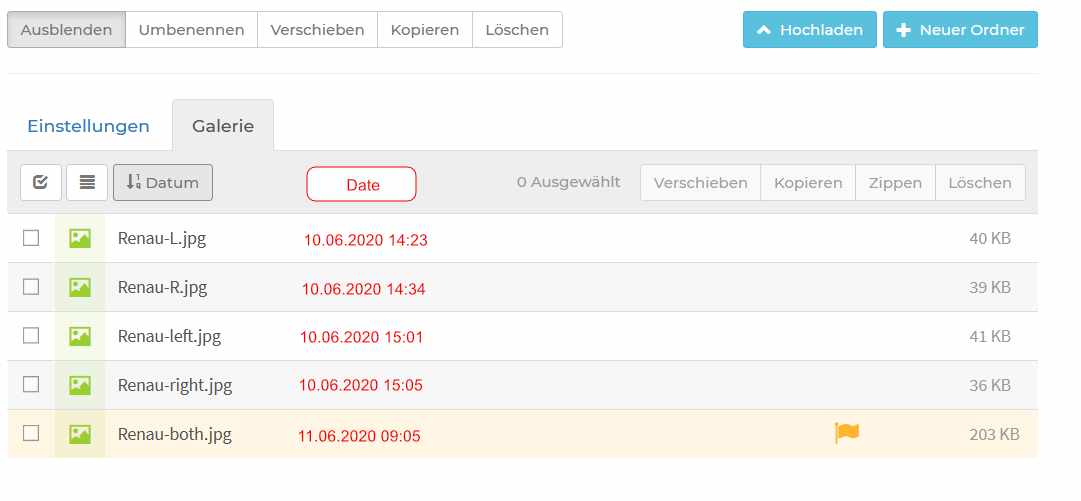
Unfortunately, I put it in imprecise terms. I mean this display:
- ListWithDate.jpg (30.58 KiB) Viewed 3911 times
All contents that can be sorted by (name, size) are shown in a separate column, only the date is missing.
Therefore an column to show the date would be a useful addition.
Re: Backend Gallery View: Sort by date not correct
Posted: 13 Jun 2020, 00:14
by mjau-mjau
pede wrote:Therefore an column to show the date would be a useful addition.
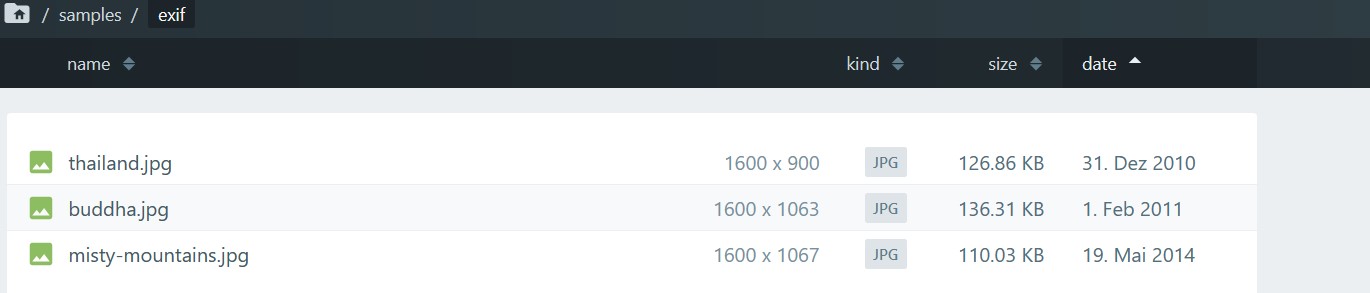
Yes it would. We already have "date" as column in our new Files App (see demo), and this will eventually become X3 panel 2.0. I might try to add it into current version also ...
Re: Backend Gallery View: Sort by date not correct
Posted: 13 Jun 2020, 06:12
by pede
That looks very good, it would be nice to have the time next to the date. ;-)
- x.jpg (38.54 KiB) Viewed 3904 times