Page 1 of 2
tabs with grid.
Posted: 23 Sep 2024, 17:08
by Faust
Hi again Karl.
I am trying to achieve similar to what is on main page using the tab plugin.
I have attached a photo, but is not really what I wanted to achieve.
I want 3 packages within each tab, and to be within tab content.
Can you help me please with the code?
Thanks
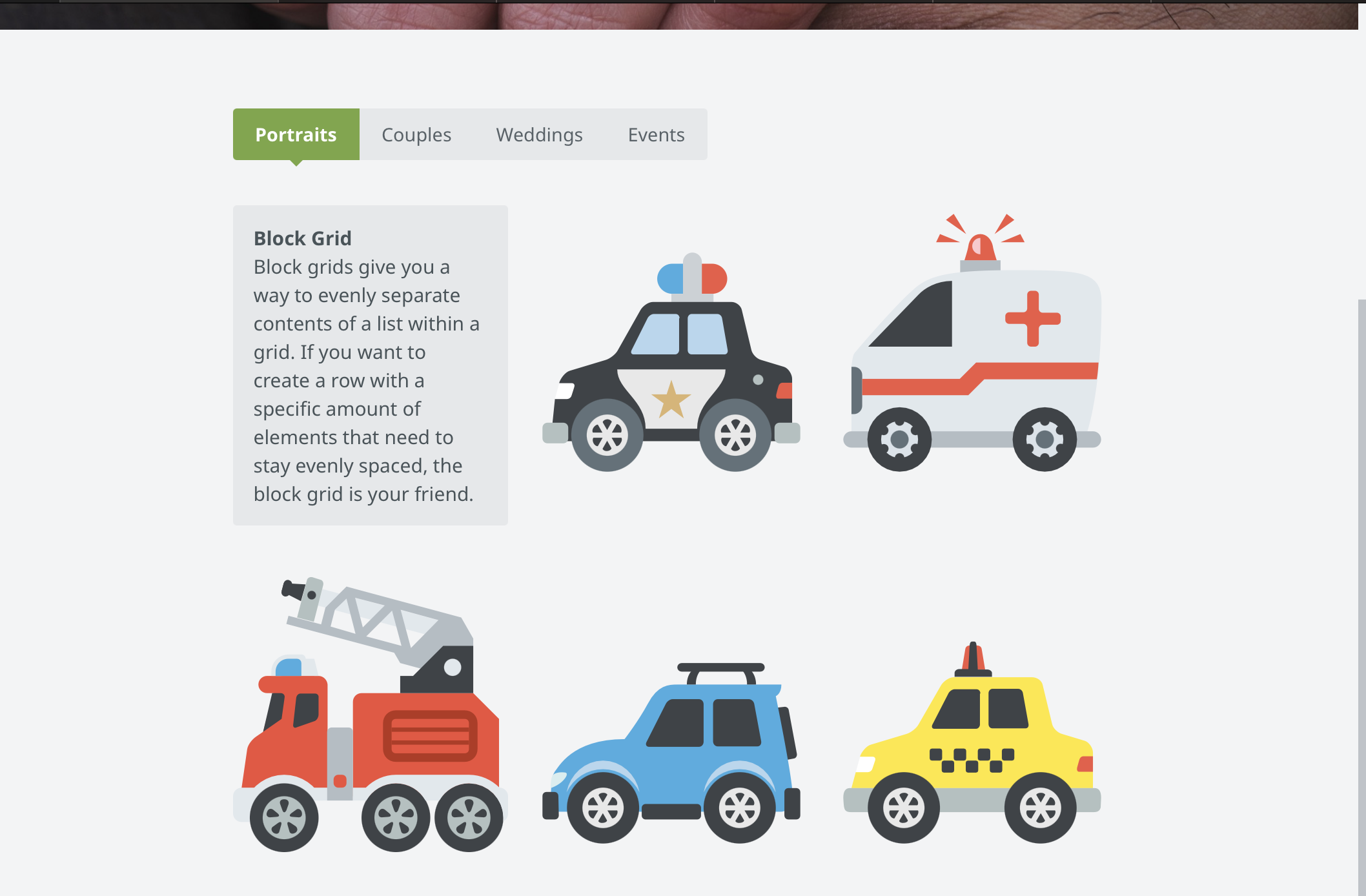
- Screenshot 2024-09-23 at 22.05.32.png (404.23 KiB) Viewed 1109 times
Re: tabs with grid.
Posted: 23 Sep 2024, 21:33
by mjau-mjau
It's a bit difficult to understand exactly what you want. As far as I can understand, the tabs are working as you like, but not the content within each tab? You can add whatever content you want inside the tabs, just keep the html tidy so you can keep track.
For more help, I need to understand what you want within each tab container. You can add a normal 3-column grid (there are example for this code in the content templates dropdown).
Re: tabs with grid.
Posted: 24 Sep 2024, 04:49
by Faust
mjau-mjau wrote:
It's a bit difficult to understand exactly what you want. As far as I can understand, the tabs are working as you like, but not the content within each tab? You can add whatever content you want inside the tabs, just keep the html tidy so you can keep track.
For more help, I need to understand what you want within each tab container. You can add a normal 3-column grid (there are example for this code in the content templates dropdown).
Something similar to what I have designed in the file. For each tab will be a package, with different prices. If you can help me with initial code for first tab, I can figure the rest tabs.
Not the best person to describe, better to design it :D
Re: tabs with grid.
Posted: 24 Sep 2024, 09:59
by metallissimus
I think this is what you want:
<section class="tabs-container tabs-radius tabs-anim tabs-color-active">

<ul class="tabs" data-tab>
<li class="tab-title active"><a href="#panel1">Portraits</a></li>
<li class="tab-title"><a href="#panel2">Couples</a></li>
<li class="tab-title"><a href="#panel3">Weddings</a></li>
<li class="tab-title"><a href="#panel4">Events</a></li>
</ul>

<div class="tabs-content">
<div class="content active" id="panel1">
<div class="row">
  <div class="medium-4 columns">
    <h3> Portraits S</h3>
    <p>including</p>
    <ul>
    <li>Item 1</li>
    <li>Item 2</li>
    <li>Item 3</li>
  </ul>
<button>Buy now</button>
  </div>
  <div class="medium-4 columns">
    <h3> Portraits M</h3>
    <p>including</p>
    <ul>
    <li>Item 1</li>
    <li>Item 2</li>
    <li>Item 3</li>
    <li>Item 4</li>
  </ul>
<button>Buy now</button>
</div>
  <div class="medium-4 columns">
    <h3> Portraits L</h3>
    <p>including</p>
    <ul>
    <li>Item 1</li>
    <li>Item 2</li>
    <li>Item 3</li>
    <li>Item 4</li>
    <li>Item 5</li>
  </ul>
<button>Buy now</button>
</div>
</div>
</div>

<div class="content" id="panel2">
<p>This is the second panel of the basic tab example.</p>
</div>

<div class="content" id="panel3">
<p>This is the third panel of the basic tab example.</p>
</div>

<div class="content" id="panel4">
<p>This is the fourth panel of the basic tab example.</p>
</div>

</div>
</section>
Looks like this (of course colours and fonts are from my styles):
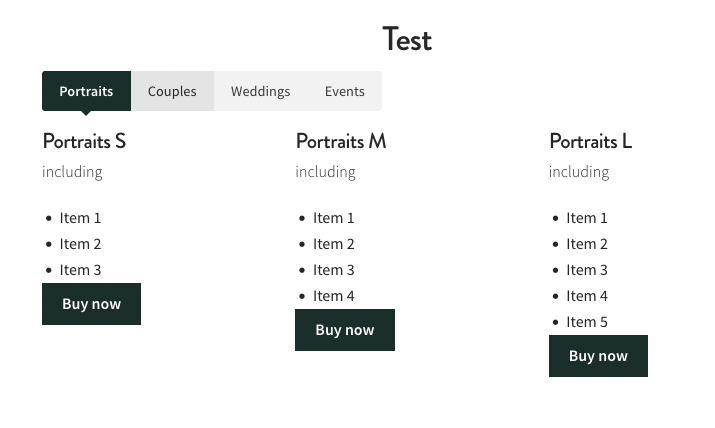
- Bildschirmfoto 2024-09-24 um 16.01.40.png (104.59 KiB) Viewed 1097 times
Re: tabs with grid.
Posted: 24 Sep 2024, 10:24
by Faust
metallissimus wrote:
I think this is what you want:
<section class="tabs-container tabs-radius tabs-anim tabs-color-active">

<ul class="tabs" data-tab>
<li class="tab-title active"><a href="#panel1">Portraits</a></li>
<li class="tab-title"><a href="#panel2">Couples</a></li>
<li class="tab-title"><a href="#panel3">Weddings</a></li>
<li class="tab-title"><a href="#panel4">Events</a></li>
</ul>

<div class="tabs-content">
<div class="content active" id="panel1">
<div class="row">
  <div class="medium-4 columns">
    <h3> Portraits S</h3>
    <p>including</p>
    <ul>
    <li>Item 1</li>
    <li>Item 2</li>
    <li>Item 3</li>
  </ul>
<button>Buy now</button>
  </div>
  <div class="medium-4 columns">
    <h3> Portraits M</h3>
    <p>including</p>
    <ul>
    <li>Item 1</li>
    <li>Item 2</li>
    <li>Item 3</li>
    <li>Item 4</li>
  </ul>
<button>Buy now</button>
</div>
  <div class="medium-4 columns">
    <h3> Portraits L</h3>
    <p>including</p>
    <ul>
    <li>Item 1</li>
    <li>Item 2</li>
    <li>Item 3</li>
    <li>Item 4</li>
    <li>Item 5</li>
  </ul>
<button>Buy now</button>
</div>
</div>
</div>

<div class="content" id="panel2">
<p>This is the second panel of the basic tab example.</p>
</div>

<div class="content" id="panel3">
<p>This is the third panel of the basic tab example.</p>
</div>

<div class="content" id="panel4">
<p>This is the fourth panel of the basic tab example.</p>
</div>

</div>
</section>
Looks like this (of course colours and fonts are from my styles):
Bildschirmfoto 2024-09-24 um 16.01.40.png
Yes, something like this, but wanted to have grid blocks per design I made above. Thanks a lot for trying.
Re: tabs with grid.
Posted: 24 Sep 2024, 11:51
by metallissimus
Faust wrote:
Yes, something like this, but wanted to have grid blocks per design I made above. Thanks a lot for trying.
You didn't mention blocks before.
It actually looks the same with the blocks, because there's not really a difference between 3 columns and 3 blocks in a row:
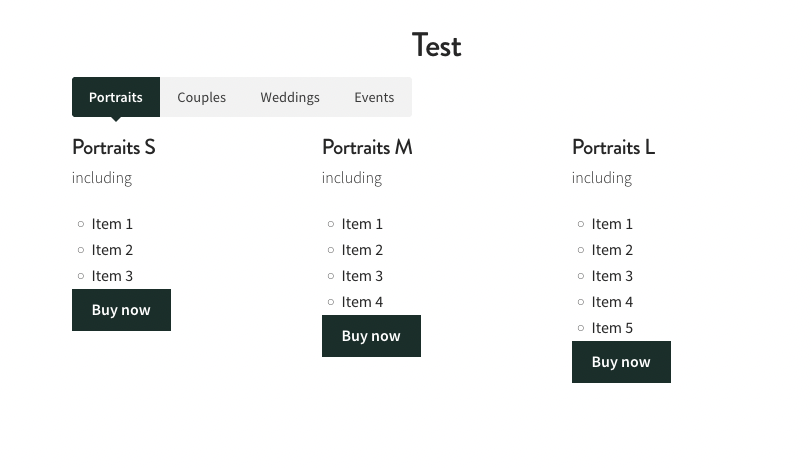
- Bildschirmfoto 2024-09-24 um 17.50.23.png (112.95 KiB) Viewed 1088 times
Here's the code:
<section class="tabs-container tabs-radius tabs-anim tabs-color-active">

<ul class="tabs" data-tab>
<li class="tab-title active"><a href="#panel1">Portraits</a></li>
<li class="tab-title"><a href="#panel2">Couples</a></li>
<li class="tab-title"><a href="#panel3">Weddings</a></li>
<li class="tab-title"><a href="#panel4">Events</a></li>
</ul>

<div class="tabs-content">
<div class="content active" id="panel1">
<ul class='small-block-grid-1 medium-block-grid-2 large-block-grid-3'>
<li> <h3> Portraits S</h3>
 <p>including</p>
 <ul>
 <li>Item 1</li>
 <li>Item 2</li>
 <li>Item 3</li>
 </ul>
<button>Buy now</button></li>
<li> <h3> Portraits M</h3>
 <p>including</p>
 <ul>
 <li>Item 1</li>
 <li>Item 2</li>
 <li>Item 3</li>
 <li>Item 4</li>
 </ul>
<button>Buy now</button></li>
<li> <h3> Portraits L</h3>
 <p>including</p>
 <ul>
 <li>Item 1</li>
 <li>Item 2</li>
 <li>Item 3</li>
 <li>Item 4</li>
 <li>Item 5</li>
 </ul>
<button>Buy now</button></li>
</ul>
</div>
<div class="content" id="panel2">
<p>This is the second panel of the basic tab example.</p>
</div>
<div class="content" id="panel3">
<p>This is the third panel of the basic tab example.</p>
</div>
<div class="content" id="panel4">
<p>This is the fourth panel of the basic tab example.</p>
</div>
</div>

</section>
Re: tabs with grid.
Posted: 24 Sep 2024, 11:55
by Faust
metallissimus wrote:
Faust wrote:
Yes, something like this, but wanted to have grid blocks per design I made above. Thanks a lot for trying.
You didn't mention blocks before.
It actually looks the same with the blocks, because there's not really a difference between 3 columns and 3 blocks in a row:
Bildschirmfoto 2024-09-24 um 17.50.23.png
Here's the code:
<section class="tabs-container tabs-radius tabs-anim tabs-color-active">

<ul class="tabs" data-tab>
<li class="tab-title active"><a href="#panel1">Portraits</a></li>
<li class="tab-title"><a href="#panel2">Couples</a></li>
<li class="tab-title"><a href="#panel3">Weddings</a></li>
<li class="tab-title"><a href="#panel4">Events</a></li>
</ul>

<div class="tabs-content">
<div class="content active" id="panel1">
<ul class='small-block-grid-1 medium-block-grid-2 large-block-grid-3'>
<li> <h3> Portraits S</h3>
 <p>including</p>
 <ul>
 <li>Item 1</li>
 <li>Item 2</li>
 <li>Item 3</li>
 </ul>
<button>Buy now</button></li>
<li> <h3> Portraits M</h3>
 <p>including</p>
 <ul>
 <li>Item 1</li>
 <li>Item 2</li>
 <li>Item 3</li>
 <li>Item 4</li>
 </ul>
<button>Buy now</button></li>
<li> <h3> Portraits L</h3>
 <p>including</p>
 <ul>
 <li>Item 1</li>
 <li>Item 2</li>
 <li>Item 3</li>
 <li>Item 4</li>
 <li>Item 5</li>
 </ul>
<button>Buy now</button></li>
</ul>
</div>
<div class="content" id="panel2">
<p>This is the second panel of the basic tab example.</p>
</div>
<div class="content" id="panel3">
<p>This is the third panel of the basic tab example.</p>
</div>
<div class="content" id="panel4">
<p>This is the fourth panel of the basic tab example.</p>
</div>
</div>

</section>
Thanks again, I wanted to achieve similar to what's on main page on Photogallery. I have kind of achieved, but still missing some CSS or the code is broken, to look a bit more professional. I want them packages to have borders as well.
Re: tabs with grid.
Posted: 24 Sep 2024, 12:10
by metallissimus
Faust wrote:
Thanks again, I wanted to achieve similar to what's on main page on Photogallery.
I don't see anything on
https://www.photo.gallery/ that matches your description or the sketch you posted earlier. I am happy to help, but please be more specific about what you want. Maybe show the current status and explain what exactly is bothering you.
Re: tabs with grid.
Posted: 24 Sep 2024, 12:27
by Faust
metallissimus wrote:
Faust wrote:
Thanks again, I wanted to achieve similar to what's on main page on Photogallery.
I don't see anything on
https://www.photo.gallery/ that matches your description or the sketch you posted earlier. I am happy to help, but please be more specific about what you want. Maybe show the current status and explain what exactly is bothering you.
I pretty much have achieved what I wanted, I got stuck with the code for the next tab. For each tab I want to have different packages:
https://happyfeelings.co.uk/prices/
Re: tabs with grid.
Posted: 24 Sep 2024, 14:12
by metallissimus
Looks quite good already. I can't help you with custom javascript unfortunately, I only know some HTML and CSS from customizing my own X3 sites rather extensively.
Re: tabs with grid.
Posted: 24 Sep 2024, 14:17
by Faust
metallissimus wrote:
Looks quite good already. I can't help you with custom javascript unfortunately, I only know some HTML and CSS from customizing my own X3 sites rather extensively.
Thanks, I will wait for Karl for extra help here. Redesigned my an other website at the moment.
Re: tabs with grid.
Posted: 25 Sep 2024, 00:11
by mjau-mjau
I might have lost track slightly. As far as I can see, you already have the design ready, but the tabs are not working? It seems like all the tabs content is outside any tabs container. Furthermore, I see 3x tabs, and 6x blocks of content, and it's unclear what blocks go inside which tabs ... It looks like there will be 3x blocks inside "couple packages", 1x block inside "premium packages" and 2x blocks inside "luxury packages", correct? In which case, you would need to create an appropriate inner grid/columns for each content section inside the tabs, like you already did for 3x "couple packages".
So with the above in mind, are you looking for a basic Javascript solution that will allow the tabs to work then? Also, because it seems you have diverged from the design of the original screenshot, which seems to have been based on the existing X3 tabs content plugin?
Re: tabs with grid.
Posted: 25 Sep 2024, 03:28
by Faust
mjau-mjau wrote: ↑25 Sep 2024, 00:11
I might have lost track slightly. As far as I can see, you already have the design ready, but the tabs are not working? It seems like all the tabs content is outside any tabs container. Furthermore, I see 3x tabs, and 6x blocks of content, and it's unclear what blocks go inside which tabs ... It looks like there will be 3x blocks inside "couple packages", 1x block inside "premium packages" and 2x blocks inside "luxury packages", correct? In which case, you would need to create an appropriate inner grid/columns for each content section inside the tabs, like you already did for 3x "couple packages".
So with the above in mind, are you looking for a basic Javascript solution that will allow the tabs to work then? Also, because it seems you have diverged from the design of the original screenshot, which seems to have been based on the existing X3 tabs content plugin?
I will remove them blocks from the bottom, I just need help to make them buttons work, and for each tab there will be different packages when clicked. Hopefully that makes more sense.
Re: tabs with grid.
Posted: 25 Sep 2024, 21:50
by mjau-mjau
Faust wrote:I will remove them blocks from the bottom, I just need help to make them buttons work, and for each tab there will be different packages when clicked. Hopefully that makes more sense.
Ok, so I will add some tab-mechanism for you ... Can you send me panel login details in a separate email?
It seems you already started as I see some `onclick="openTab('premium')"` in the links.
Re: tabs with grid.
Posted: 26 Sep 2024, 00:38
by Faust
mjau-mjau wrote: ↑25 Sep 2024, 21:50
Faust wrote:I will remove them blocks from the bottom, I just need help to make them buttons work, and for each tab there will be different packages when clicked. Hopefully that makes more sense.
Ok, so I will add some tab-mechanism for you ... Can you send me panel login details in a separate email?
It seems you already started as I see some `onclick="openTab('premium')"` in the links.
Thanks Karl. I will PM the credentials to you .