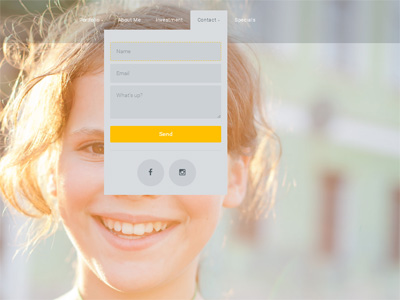
Irina_ wrote:I think i got lost with settings. I set up Link URL as /contact/ but nothing has changed.
Not sure what you are trying to do. The link is ALREADY /contact/ ... You only use the LINK feature if you want to actually link the menu-item to another website, or another page. There is no use in linking the page to itself, as that is already the link.
Irina_ wrote:Mobile users don't see this form, but they see menu "Contact" and get to a contact page (
http://irinagaleevaphotography.ca/contact/)
Computer users can get to this page only by clicking an icon in footer. I want to change it but I don't know how.
Ideally, I want to have the opportunity for mobile users to use this pop-up and for computer users to go on contact page when they click "Contact" in menu, but I don't know how to set it up. Could you please help me.
Please give me login to your panel ... You are over-complicating things. This is already how it works in the default sample (see
demo).
Irina_ wrote:I want to have the opportunity for mobile users to use this pop-up
No can do. Mobile users won't see this menu at all, simply because it does not fit and is not suitable in terms of UI.